
What Happens If You Delete the Instagram App?
Here is the short answer: nothing happens to your Instagram account when you delete the Instagram app. Your profile stays public, your posts and reels stay up, your DMs keep arriving, and anyone who looks for you finds you exactly where you were. The only thing that changes is that you stop seeing Instagram. Everyone else still sees you.
That distinction trips up a lot of people, so it is worth being precise. The app on your phone is just a window into your account. The account itself — username, photos, messages, followers — lives on Instagram’s servers, not on your device. Uninstalling the window does not touch what is behind it. If you were hoping that dragging the icon to the trash would quietly take your presence offline, it will not.
What Stays Exactly the Same
Everything that other people can see, in short. After you delete the app:
- Your profile stays visible and searchable. Anyone can still open your page, read your bio, and scroll your grid. If your account is public, it stays public.
- Your posts, reels, carousels, and highlights stay live. Nothing is archived, hidden, or paused. New visitors can like and comment as usual.
- DMs keep arriving. People can message you normally, and nothing tells them you are gone. Their messages simply sit unread in your inbox until you log back in from a reinstalled app or a browser. Group chats carry on without you.
- Tags, mentions, and comments keep accumulating. Friends can tag you in photos, mention you in stories, and reply to your old comments. Your name keeps circulating whether the app is on your phone or not.
- Your followers and following lists do not move. No one is unfollowed, and nobody loses access to you.
- Other sessions stay logged in. If you use Instagram on a tablet or in a web browser, those sessions are untouched.
There is also no signal that you removed the app. Instagram does not badge your profile, notify your followers, or mark you as inactive. At most, attentive friends notice that you stopped posting and stopped answering.
What Actually Changes on Your Phone
Deleting the app is a device-level cleanup, and on your device it does change a few real things:
- You get storage back. The Instagram app itself is a few hundred megabytes, but its cache — preloaded reels, images, and video — can quietly grow to several gigabytes. Uninstalling removes the app along with its cached data. Photos you posted are safe on Instagram’s servers, and anything saved to your camera roll stays in your camera roll.
- Unposted drafts can be lost. Drafts live locally inside the app on that device. If you have an unposted reel or an edited photo sitting in drafts, deleting the app can delete it with no way back.
- Notifications stop on that device. No more pings about likes, comments, or DMs — which is precisely why app deletion works so well as a focus break.
- That device’s session ends. Reinstall the app or open instagram.com, log in, and everything is exactly as you left it: same inbox, same grid, same followers. Recovery takes about a minute, which is also why this move is so easy to undo — for better or worse.
If Privacy Is the Goal, Deleting the App Is the Weakest Move
People rarely search “what happens if you delete the Instagram app” out of idle curiosity. Usually the real goal is one of two things: a break from the feed, or some version of I want less of me on there. For the first goal, deleting the app is perfect. For the second, it is the weakest rung on a four-step ladder:
- App removal changes what you see. Your entire history remains public and screenshot-able.
- Content cleanup changes what others see. Deleting old posts, comments, likes, and DMs actually removes material from view — while your account, name, and current presence stay intact.
- Deactivation hides your whole profile temporarily. Effective, but everything comes back the moment you log back in.
- Account deletion removes your presence permanently after Instagram’s waiting period.
Notice that rung two is the only one that reduces your exposure without taking you off the platform entirely. It is also the rung Instagram makes hardest: natively, you delete posts one by one, comments one by one, and DMs conversation by conversation. A ten-year-old account can mean thousands of taps.
Clean up in bulk
Unpost deletes your Instagram content for you
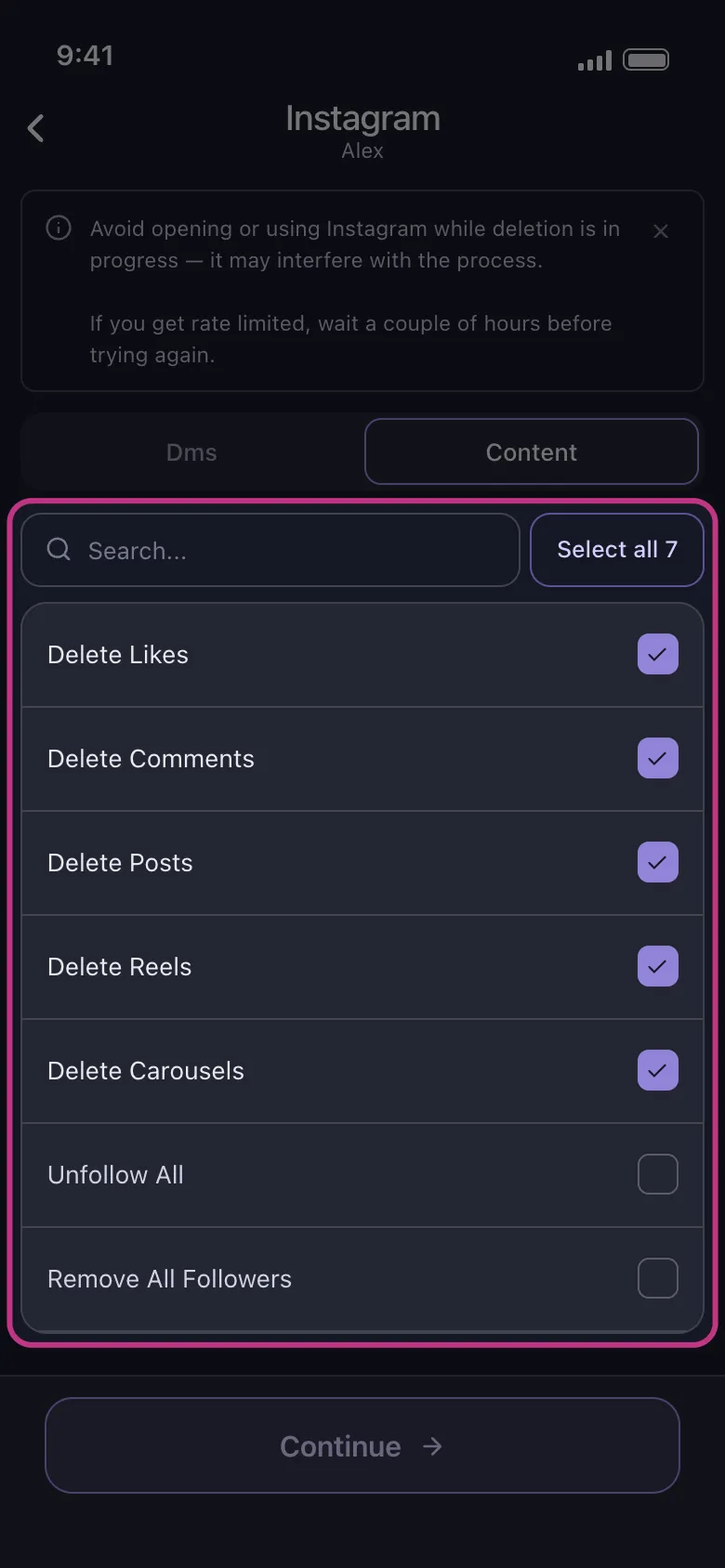
Unpost is a mobile app for iOS and Android that bulk deletes your Instagram DMs, posts, reels, carousels, comments, and likes, and can unfollow everyone or remove all followers. It cleans up the content that stays visible no matter how many times you uninstall the app.
Get UnpostThe Right Order If You Are Leaving for Good
If your plan is bigger than a break — you genuinely want out — do not start by deleting the app. Work in this order:
-
Export your data. In Accounts Center, request a download of your information: photos, messages, and account history. Once an account is deleted, that option is gone.
-
Clean up what you do not want to leave behind. Account deletion is broad but blunt, and messages are where expectations get burned: copies of conversations in other people’s inboxes are not guaranteed to vanish on your schedule, so clear the chats you care about before you go. The same logic applies to posts and comments you would rather remove deliberately than abandon.
-
Deactivate or delete the account. Take the reversible break or the permanent exit through Accounts Center — the full walkthrough is in how to delete or deactivate an Instagram account.
-
Then delete the app, last. At that point it is just removing an empty window.
Delete App vs Deactivate vs Delete Account
| Action | Profile visibility | Your DMs | Reversibility |
|---|---|---|---|
| Delete the app | Unchanged — fully visible | Keep arriving, wait unread | Instant: reinstall and log in |
| Deactivate account | Hidden until you log back in | Previously sent messages can still sit in recipients’ inboxes | Fully reversible by logging in; deactivation is limited to once a week |
| Delete account | Removed once the deletion request completes | Your access ends; copies others hold are not guaranteed to disappear | Cancelable for roughly 30 days, then permanent |
Bottom Line
Deleting the Instagram app is a phone decision, not an account decision. Take the break — your account will sit there unchanged for as long as you stay away. But if the question behind your search was really about privacy, your profile being live and visible is the part to fix, and that means dealing with the content itself. Start with the Instagram cleanup guide to see what is worth wiping, let Unpost handle the bulk work, and save deactivation or deletion for when you are sure.
Frequently Asked Questions

Get Started
Delete Old Content Across Your Accounts
Bulk delete messages, posts, likes, comments, DMs, reactions, bookmarks, followers, and more — all from one app.
No password storage • Free to start • iOS & Android
 Download for iOS
  Download for Android