
How to Delete a Retweet (or Undo Them All)
Undoing a retweet takes two taps and carries zero risk. Find the post on your profile — or open the original tweet — and tap the repost icon, the pair of arrows that turned green when you retweeted it. Choose Undo repost from the little menu that appears. That’s it: the retweet vanishes from your profile instantly, the original poster gets no notification, and their tweet keeps sitting on their profile exactly as before. You haven’t deleted anyone’s content, because a plain retweet never created any — you’ve simply stopped rebroadcasting it.
That’s the complete answer for one retweet. The rest of this guide covers what people actually get stuck on: the exact steps in the app and on the web, why quote posts follow a completely different rule, how to undo retweets in bulk when there are hundreds of them, and what to do when a retweet refuses to disappear.
How to Undo a Retweet: Quick Steps
In the X app (iOS or Android):
- Open the X app and tap your profile picture to reach your profile.
- Scroll your Posts timeline to the retweet — it carries a “You reposted” label above it.
- Tap the repost icon (the two arrows, shown in green).
- Tap Undo repost — on older versions the label reads “Undo Retweet”.
On the web:
- Go to x.com and open your profile.
- Find the reposted tweet on your timeline.
- Click the green repost icon beneath it.
- Click Undo repost.
A few details about what just happened. The removal is instant — no confirmation dialog, no grace period, no trash folder, because nothing of yours existed to throw away. Nobody is told: the author isn’t notified, and your followers don’t get an alert. The only trace is the post’s repost counter ticking down by one, which the author would have to be watching live to catch. And the action is fully reversible — you can retweet the same post again any time, which is more than can be said for deleting an actual tweet.
One navigation tip: retweets don’t get their own tab on your profile. They’re mixed into your main Posts feed, so finding an old one means scrolling — there’s no native filter that shows retweets only.
Quote Posts Are a Different Job
Most of the confusion around “deleting a retweet” starts here. X gives you two ways to share someone’s post, and they’re removed in two entirely different ways.
A plain retweet rebroadcasts someone else’s tweet with nothing added. It creates no content of your own, which is why you undo it rather than delete it.
A quote post — formerly a quote tweet — wraps someone else’s post inside a comment you wrote. The moment you hit post, that became your tweet: it lives on your profile as your content, with its own likes, replies, and repost count. So it’s removed like any other tweet: open it, tap the three-dot menu, choose Delete, confirm. And unlike undoing a retweet, that deletion is permanent — there’s no taking it back.
The practical consequence for a cleanup: you have two piles. Retweets get undone through the repost icon; quote posts get deleted through the three-dot menu, along with the rest of your timeline. If the job is bigger than a handful of posts — quote posts, replies, and originals included — our guide to deleting all your tweets covers that full sweep.
Undoing Retweets in Bulk
One retweet is two taps. A decade of retweeting is another story: heavy sharers pile up hundreds or thousands, and X offers no select-all, no “undo all retweets” button, and no bulk option of any kind.
The manual sweep works when the pile is small. Open your profile, scroll the Posts feed, and undo every “You reposted” entry as you pass it. For a few dozen retweets this is genuinely the fastest route. It has two limits, though: X’s timeline eventually stops serving very old posts, so the deepest retweets can sit out of scrolling reach, and since retweets share the feed with everything else, you wade through your whole history to find them.
A bulk tool is the realistic answer past about fifty. Unpost is a mobile app for iOS and Android that handles the sweep from your phone: it signs in through the regular X web login, keeps the encrypted session on your device, and undoes retweets exactly the way you would by hand — one at a time, at a pace that respects X’s rate limits. Filter the run down to retweets specifically, narrow it by date range if only a certain era needs to go, review the selection, and let it work through the list. The same app clears your likes too — the other invisible pile most cleanups forget, which our guide to deleting your Twitter likes walks through.
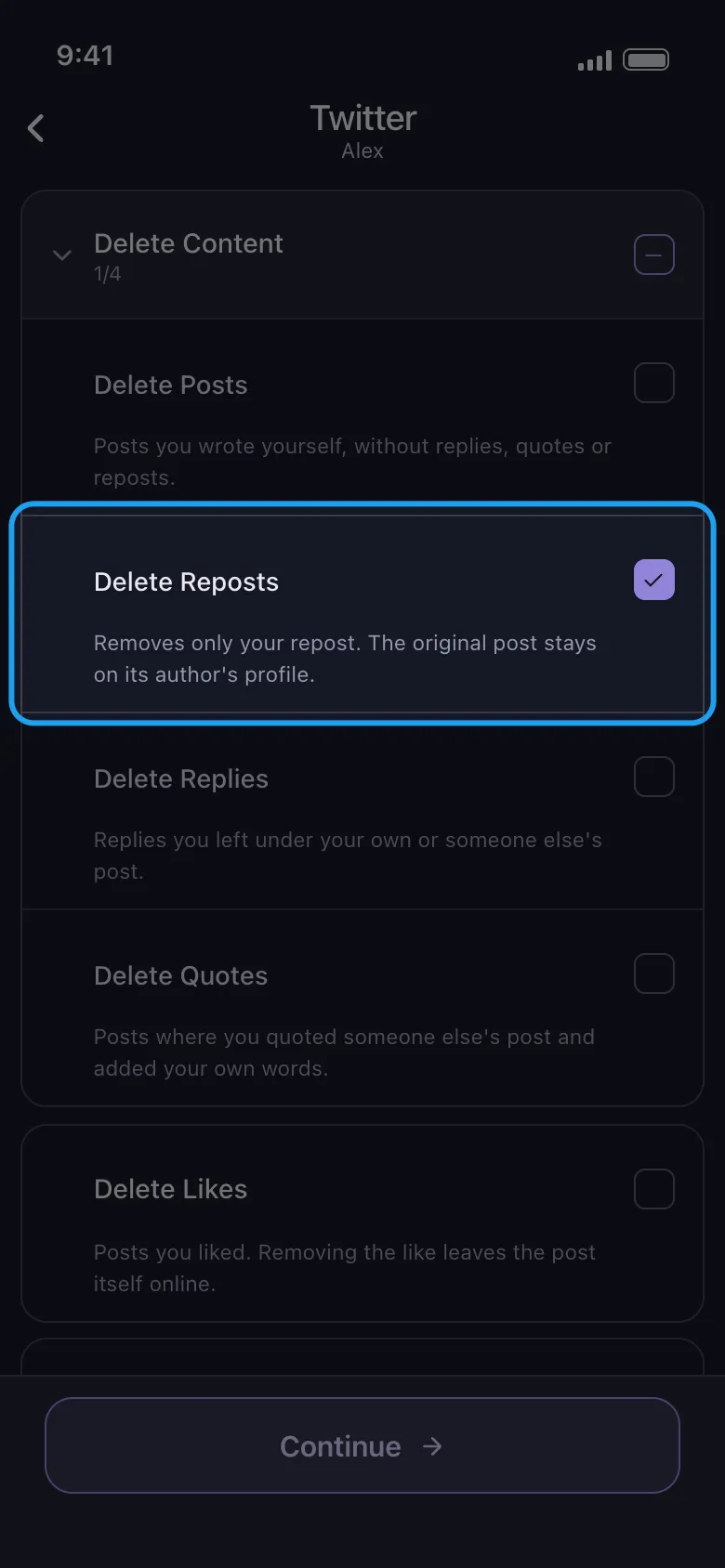
Clean Up Your Retweets
Undo all your retweets without handing over your password.
Unpost signs in on your device through the regular X web login and undoes your retweets the way you would manually — with filters to target retweets, date ranges, and the history you want gone.
The free plan includes a daily allowance — enough to clear a modest retweet history over a few days; premium removes the cap for serious backlogs.
When a Retweet Won’t Undo
Sometimes a retweet looks stuck: you tap Undo repost and it’s still sitting on your profile. Nearly every case traces back to one of four causes.
A stale cache. The most common one by far. The undo actually worked, but the app keeps showing a cached copy of your profile. Pull down to refresh, or force-close and reopen the app; on the web, a hard refresh does it. Checking from a logged-out browser tab settles any doubt about what other people see.
The original was deleted. If the author removed their post — or their whole account — your retweet can linger as a ghost entry with nothing left to tap on. These clear out on their own as X’s systems catch up; annoying, but temporary and invisible to everyone but you.
The account went protected or blocked you. When an author protects their account, X automatically withdraws existing retweets of their posts; if they blocked you, you lose access to the post entirely. In both cases the leftover entry on your side may render oddly or show as unavailable until things sync.
Rate limits. Undo dozens in quick succession and X may quietly throttle you for a few minutes, so a few taps don’t register. Wait briefly and retry — and if nothing else works, the boring fixes apply: update the app, log out and back in.
Retweet vs Quote Post at a Glance
| Plain retweet | Quote post | |
|---|---|---|
| How to remove it | Green repost icon → Undo repost | Three-dot menu → Delete → confirm |
| What others see after | Original tweet untouched; its repost count drops by one; nobody is notified | Your comment is gone permanently; the tweet you quoted stays up on its author’s profile |
Whether it’s one regrettable retweet from last night or ten years of reflexive sharing, the mechanics are now yours: undo the retweets, delete the quote posts, and hand anything heavier to a bulk tool. Under fifty, do it by hand today; past that, get Unpost and let your phone do the tapping.
Frequently Asked Questions

Get Started
Delete Old Content Across Your Accounts
Bulk delete messages, posts, likes, comments, DMs, reactions, bookmarks, followers, and more — all from one app.
No password storage • Free to start • iOS & Android
 Download for iOS
  Download for Android