
How to Delete an Instagram Story
Reviewed by Unpost Team
If you want to know how to delete a story on Instagram, the short answer is: open your current Story, tap the menu, choose Delete, and confirm. If the Story already expired, open your Story Archive, find the Story item, and delete it there. If the Story is only showing in a Highlight, edit the Highlight and remove that Story from the collection, or delete the archived Story if you want the underlying Story gone.
That is a native Instagram task, not an Unpost feature. Unpost does not delete Instagram Stories. Where Unpost fits is the cleanup that often comes right after: DMs, posts, reels, carousels, likes, comments, unfollow all, and remove all followers. If your Story cleanup is part of a larger reset, the Instagram cleanup guide is the best next stop.
| Cleanup need | Native Instagram method | What it does | When Unpost is better |
|---|---|---|---|
| Delete a live Story before it expires | Open the Story, use the menu, and delete it | Removes the Story viewers can currently see | Unpost is not for Story deletion |
| Delete an expired Story from Archive | Open Story Archive, find the Story, and delete it | Removes a past Story item saved in Archive | Unpost is better if the real task expands into broader Instagram cleanup |
| Remove a Story from a Highlight only | Edit the Highlight and remove that Story from the collection | Takes the Story out of the Highlight while the archived Story usually stays available | Unpost is better for bulk cleanup across supported content types |
| Clean up many other Instagram items after Story cleanup | Use Instagram one item at a time | Works for small manual jobs | Unpost is better for DMs, posts, reels, carousels, likes, comments, unfollow all, and remove all followers |
What This Does and What It Does Not Do
What this does
- Explains how to delete a live Instagram Story.
- Explains how Story Archive and Highlights change the deletion flow.
- Clarifies the difference between deleting a Story, removing a Story from a Highlight, and deleting a permanent post.
- Shows what Unpost can help with instead when the cleanup job is larger than one Story.
What this does not do
- Claim that Unpost deletes Instagram Stories.
- Assume every Instagram app version uses the exact same labels.
- Treat Archive like a trash can. Story Archive is usually a saved-history area, not a hidden delete folder.
Native Instagram Method
If your search was how to delete instagram story, how to delete an instagram story, or delete story instagram, the current flow is usually straightforward.
How to delete a live Instagram Story
Use this when the Story is still active in your Story tray and visible to viewers.
- Open Instagram and go to your current Story.
- Tap the menu on the Story, usually shown as More or a three-dot icon.
- Tap Delete.
- Confirm the deletion.
That removes the live Story item instead of waiting for it to disappear on its own after about 24 hours.
How to delete an expired Story from Archive
Use this when the Story already expired and is no longer live. This only works if Instagram saved it in Story Archive, which usually depends on your archive setting being on when the Story was posted.
- Open Instagram and go to your profile.
- Open the menu and find Archive.
- Make sure you are viewing Story Archive.
- Open the Story item you want to remove.
- Tap the menu and choose Delete.
- Confirm the deletion.
This is the better answer when someone says how to delete a story on instagram but the Story is no longer live.
How to remove a Story from a Highlight
Use this when the Story is no longer live but still appears on your profile inside a Highlight.
- Open your profile and tap the Highlight that contains the Story.
- Open the specific Story inside that Highlight.
- Tap the menu.
- Choose the option to edit the Highlight or remove the Story from that Highlight.
- Save the change.
Removing a Story from a Highlight is not always the same as deleting the underlying archived Story. If you only remove it from the Highlight, the Story usually stays in your Story Archive. If you delete the archived Story itself, Instagram typically removes the underlying item, which can also affect any Highlight using it.
Live Story vs Archive vs Highlight vs Permanent Post
This is the part that causes most confusion.
| Item type | Where it appears | What deletion usually means |
|---|---|---|
| Live Story | At the top Story tray and Story viewer for up to about 24 hours | Deleting it removes the current Story item viewers can still open |
| Story in Archive | In your private Story Archive after expiry, if archiving was enabled | Deleting it removes the saved Story item from Archive |
| Story inside a Highlight | On your profile as part of a saved Highlight collection | Removing it from the Highlight only takes it out of that collection |
| Permanent post | In your profile grid, reels tab, or feed history until archived or deleted | Deleting it removes a normal post, reel, or carousel, which is a separate workflow from Story cleanup |
The practical difference is simple:
- A live Story is temporary content that is still visible right now.
- Story Archive is your saved Story history, not the same thing as a Highlight.
- A Highlight is a profile collection built from Story items.
- A permanent post is normal feed content and should be managed with the separate guide on how to delete Instagram posts, photos, reels, and carousels.
What Unpost Can Help With Instead
Unpost does not currently delete Instagram Stories, so Instagram’s native method is the correct path for this specific task.
What Unpost can help with instead on Instagram:
- delete DMs
- delete posts
- delete reels
- delete carousels
- delete likes
- delete comments
- unfollow all
- remove all followers
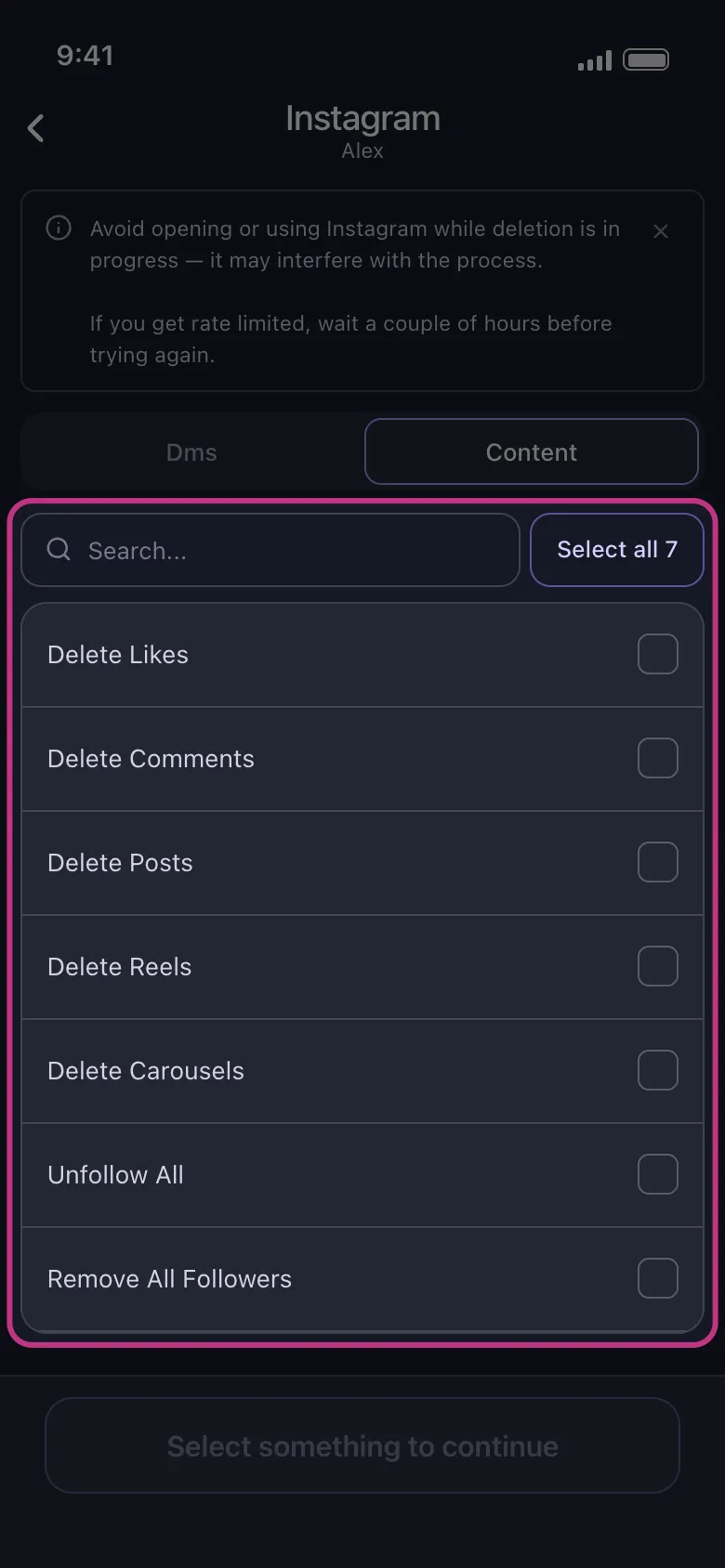
That makes Unpost useful when Story deletion is only one small part of a bigger reset. For example, you might manually remove a Story today, then decide you also want to clean up old feed content, likes, comments, or follower relationships. In that case, Try Unpost, a mobile app for iOS and Android built for privacy-focused bulk cleanup on supported Instagram actions.
Unpost connects through Instagram web login in an embedded browser and stores encrypted session data locally on your device. Keep Unpost in the foreground while deletion runs, and do not actively use Instagram at the same time because that can interfere with the process. If Instagram rate limits an action, the process may need to pause and retry.
When Unpost Is Better
Story deletion is usually a one-off task. Unpost becomes relevant only when the Story was the most visible part of a wider cleanup problem.
Common examples:
- You deleted one Story and then realized older posts still show outdated branding.
- You removed a Highlight item and then noticed your profile still has old reels or carousels you no longer want public.
- You are preparing to pause the account and want to clean up supported activity first.
If that sounds familiar, the next guide depends on your real job:
- Use how to delete Instagram posts, photos, reels, and carousels if your profile grid and reels tab need cleanup.
- Use how to delete or deactivate an Instagram account if you are leaving Instagram entirely or pausing the account for a while.
If you only need to delete one Story, native Instagram is the right tool. If you want to remove many supported Instagram items after the Story is gone, Try Unpost for the cleanup categories it actually supports instead of using it for an unsupported Story action. That is also the point where the full Instagram cleanup guide becomes more useful than a one-page Story tutorial.
FAQs
Can I delete an Instagram Story before 24 hours are up?
Yes. Open the live Story, use the menu, and delete it manually. You do not need to wait for the Story to expire on its own.
If I remove a Story from a Highlight, is it deleted from Archive too?
Usually no. Removing a Story from a Highlight normally only removes it from that Highlight collection. If you want the underlying Story gone, delete the archived Story item itself.
Does Unpost delete Instagram Stories?
No. Unpost does not currently delete Instagram Stories. On Instagram, Unpost supports deleting DMs, posts, reels, carousels, likes, and comments, plus unfollow all and remove all followers.
Bottom Line
If you want the short answer to how to delete a story on instagram, open the live Story and delete it from the Story menu. If the Story already expired, look in Story Archive. If the Story is only in a Highlight, remove it from that Highlight or delete the archived Story if you want the underlying Story gone.
That part is native Instagram only. Unpost does not delete Stories, and it should not be presented as if it does. Where Unpost fits is the cleanup around the Story: supported bulk removal of DMs, posts, reels, carousels, likes, comments, followers, and following when the Story was only the beginning of a larger privacy or profile cleanup.

Get Started
Delete Old Content Across Your Accounts
Bulk delete messages, posts, likes, comments, DMs, reactions, bookmarks, followers, and more — all from one app.
No password storage • Free to start • iOS & Android
 Download for iOS
  Download for Android