
How to See Deleted Messages on Instagram: What You Can Still Check
Reviewed by Unpost Team
In most cases, you cannot simply reopen Instagram and see a deleted or unsent message again in the chat. If a message was unsent, Instagram typically removes it from the conversation view. If you deleted a conversation from your inbox, the thread usually disappears only for you, not for the other person. The realistic checks are narrower: the live chat, notification previews you already saw, screenshots or exports you already saved, and Instagram’s own account-level recovery areas when they still apply.
| Check or method | What it does | What is realistic | When Unpost is better |
|---|---|---|---|
| Open the live Instagram chat | Confirms whether the message is still visible in the conversation | Useful if you are not sure whether the chat was deleted, archived, or only removed from your inbox | Unpost is better when the goal is planned DM cleanup, not recovery |
| Check notification previews or saved screenshots | Shows text you already saw on a device or saved elsewhere | Sometimes helpful for partial message text, but not a full recovery method | Unpost is better when you want to remove many old DMs after deciding what to keep |
| Check Instagram’s account-level recovery or download options | Lets you inspect what Instagram still makes available through official tools | Can help in limited cases, but it is not a guaranteed restore button for deleted or unsent DMs | Unpost is better when the real job is bulk cleanup across DMs and other Instagram activity |
| Ask whether the other person still has the thread | Confirms whether a deleted chat was only removed from your side | Often the most realistic answer when you deleted a conversation from your inbox | Unpost is better when you want to clean up your own side intentionally at scale |
What This Does and What It Does Not Do
What this does
- Explain how to see whether an Instagram message is still visible somewhere official or incidental.
- Clarify the difference between a deleted chat, an unsent message, a notification preview, and downloaded account data.
What this does not do
- Promise that deleted or unsent Instagram messages can always be recovered.
- Claim that Unpost recovers deleted messages. Unpost is for cleanup, not recovery.
Myth vs. Reality
| Myth | Reality |
|---|---|
| ”There is a hidden Instagram inbox where all deleted messages come back.” | Instagram usually does not let you reopen a DM thread and browse deleted or unsent messages again. |
| ”A data download will always bring back deleted chats.” | Downloaded account data can be useful, but it is not a magic undelete tool and may not include deleted or unsent messages. |
| ”If I deleted the conversation, the other person lost it too.” | Deleting a chat from your inbox usually removes it only from your side. |
| ”If someone unsent a message, Instagram still keeps it visible somewhere obvious.” | If someone unsends a message, the live chat usually no longer shows it. A notification preview or screenshot is different from in-app recovery. |
Deleted Chat vs. Unsent Message vs. Notification Preview vs. Downloaded Data
Deleted conversation
Deleting a conversation from your inbox usually means you removed the thread from your own inbox view. That does not usually erase the other person’s copy.
Unsent message
When someone unsends a message, Instagram typically removes that specific message from the live conversation. If you are asking can you recover unsent Instagram messages, the honest answer is usually no inside the chat itself.
Cached notification preview
Your phone, watch, or notification center may still show part of a message you already received. That can help you confirm what was there, but it is device behavior, not Instagram recovery.
Downloaded account data
Downloaded account data is a copy of information Instagram still makes available when you request an export. A copy you downloaded earlier may contain information from before a cleanup session. A new export you request today is not a time machine.
Native Instagram Method
There is no guaranteed native Instagram “restore deleted DM” button, but there are still a few official checks worth doing.
1. Reopen the conversation and confirm what actually happened
Start with the obvious check. Open Instagram and see whether the message is truly gone or whether the issue is something else, such as the conversation being removed from your inbox. If the message is gone but the thread remains, you are probably dealing with unsend or deletion at the message level.
2. Check Instagram’s account-level recovery area if the removal was recent
Instagram’s help pages say content you delete from your account, including Direct Messages, moves to Recently Deleted. The current flow is usually under your profile menu and Your activity. This is the main native check when you deleted the content yourself. It is not the same as reopening a chat and seeing a message someone else unsent.
3. Request or review your Instagram data export
If you want to see whether Instagram still includes any relevant copy in your account data, request your download through Accounts Center and review the files you receive. The limit matters: downloaded account data is not a reliable recovery path for deleted or unsent DMs.
A Realistic Checklist for Trying to See Deleted Instagram Messages
Use this checklist in order. It keeps the recovery question grounded in what you can actually inspect.
- Open the chat and confirm whether the message is truly missing or whether only the conversation list changed.
- Ask whether you deleted the conversation from your inbox or whether someone unsent a message.
- If you deleted the chat, check whether the other participant still has the conversation.
- Check your phone’s notification history, lock screen, smartwatch alerts, or any screenshot backups for text you already saw.
- Look in Instagram’s account-level recovery area if the deletion was recent and Instagram currently offers that path for the content type involved.
- Review any older data export you already saved, or request a new one with realistic expectations.
- If the message was unsent and you have no other copy, assume the message is usually not recoverable inside Instagram.
What Happens After You Delete Instagram Messages
People often search what happens after you delete Instagram messages because the app uses similar language for different actions.
- If you delete a conversation from your inbox, the thread usually disappears from your inbox only.
- If you unsend a message, the message usually disappears from the conversation itself.
- If you already saw a notification preview, your device may keep a short-lived partial copy outside the Instagram chat.
- If you download your account data later, the export may show what Instagram still includes, but it does not reliably recreate deleted or unsent message history.
That is why “deleted” is too vague on its own.
Can You Recover Deleted Instagram Messages?
If you are asking can you recover deleted Instagram messages, the most realistic answer is: sometimes you can still find evidence of the message, but you often cannot restore the full DM inside Instagram. The best cases are when the conversation was only removed from your inbox, when the other person still has the thread, or when you already have a notification preview, screenshot, or older export.
For can you recover unsent Instagram messages, the answer is usually even narrower. Once a message is unsent, the chat normally stops showing it.
Why Many Recovery Pages Overpromise
Some pages talk about how to see deleted Instagram posts and then quietly apply the same idea to DMs. That is misleading. Deleted posts and deleted messages are not the same workflow.
Other pages treat data downloads as if they were a full archive of everything ever sent. That is also too broad.
If an article promises a secret inbox, a guaranteed restore trick, or a universal recovery app, it is probably overselling the situation.
When Unpost Is Better
Unpost is not a recovery tool, so it is not the answer to a missing DM. Unpost is the better option when the question turns into a cleanup decision: you checked what you needed, you know what should stay, and now you want to remove old Instagram activity on purpose.
On Instagram, Unpost supports deleting DMs, posts, reels, carousels, likes, comments, unfollow all, and remove all followers. If you are finished checking what you wanted to keep and now want a cleaner account, Try Unpost, a mobile app for iOS and Android built for privacy-focused Instagram cleanup.
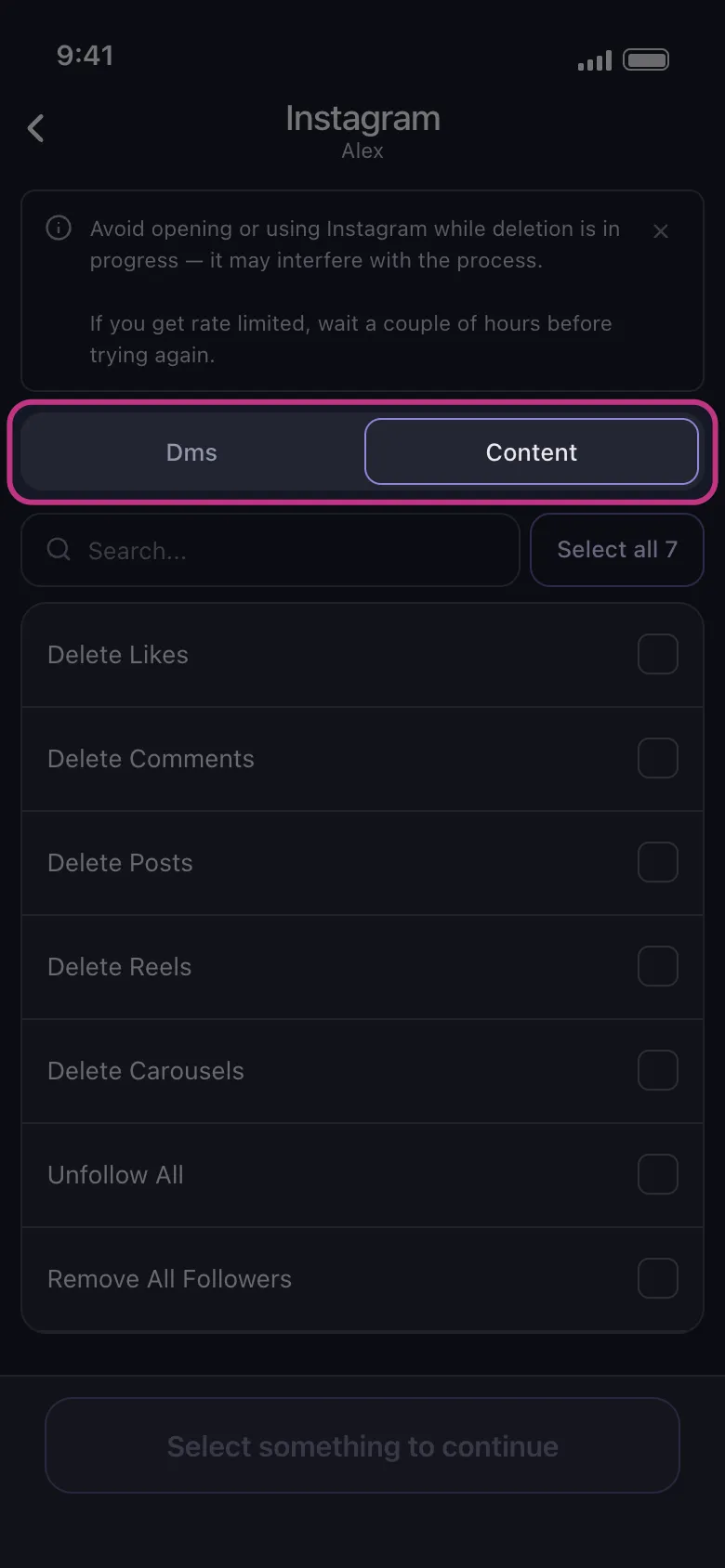
Unpost connects through Instagram web login in an embedded browser and stores encrypted session data locally on your device. During deletion, keep the app in the foreground and avoid actively using Instagram at the same time, because that can interfere with the process. If Instagram rate limits an action, the session may need to pause and retry before continuing.
Who should use Unpost here?
Unpost is the right fit on this page for people who are planning the next step, not trying to reverse the last one.
- People who want to clean up many Instagram DMs after deciding which chats or information to keep.
- People doing broader account cleanup across posts, reels, carousels, likes, comments, unfollow all, and remove all followers.
If you are still in recovery mode, stay with the native checks first. If you are in cleanup mode, Unpost becomes the more practical tool.
Next Step, Based on What You Actually Want
If your question changed while reading, use the guide that matches the real job:
- Read how to delete Instagram messages and chats if you want the full difference between deleting a chat, unsending a message, and cleaning up DMs.
- Read if you unsend a message on Instagram does it notify if your main concern is what the other person may still notice.
- Read how to delete Instagram messages from both sides if your real goal is removing messages you sent.
- Read the Instagram cleanup guide if DM cleanup is only one part of a wider Instagram reset.
FAQs
Can you recover deleted Instagram messages after deleting a chat?
Sometimes you can still find the thread elsewhere, especially if the deletion only removed the conversation from your inbox and the other person still has it. But deleting a chat is not the same as keeping a restore copy inside Instagram, so recovery is still limited.
Can you recover unsent Instagram messages?
Usually not from inside the chat. If you already saw the message in a notification preview or saved it somewhere else, you may still have a partial copy. Otherwise, unsent messages are usually no longer visible in Instagram.
Bottom Line
If you want to know how to see deleted messages on Instagram, the honest answer is that most deleted or unsent messages do not simply reappear inside the app. The realistic checks are the live chat, the other person’s thread, notification previews, screenshots, and any official account data or recovery views Instagram still makes available.
If the real task is planned cleanup instead of recovery, start with how to delete Instagram messages and chats for DM context, and Try Unpost when you want a privacy-first way to clean up many Instagram DMs and other account activity on purpose.

Get Started
Delete Old Content Across Your Accounts
Bulk delete messages, posts, likes, comments, DMs, reactions, bookmarks, followers, and more — all from one app.
No password storage • Free to start • iOS & Android
 Download for iOS
  Download for Android