
So meldest du dich an – und was hilft, wenn die Anmeldung nicht klappt
Unpost hat kein eigenes Anmeldeformular und kein Unpost-Konto. Beim Verbinden öffnet sich die echte Anmeldeseite der Plattform in der App: Dort meldest du dich an, Unpost speichert dein Passwort nie, und die Anmeldung bleibt auf deinem Handy. Du musst keine Berechtigung erteilen: Sobald sich die Seite schließt, ist das Konto verbunden. Niemand von Unpost wird dich jemals nach deinem Passwort oder einem Anmeldecode fragen.
- 01
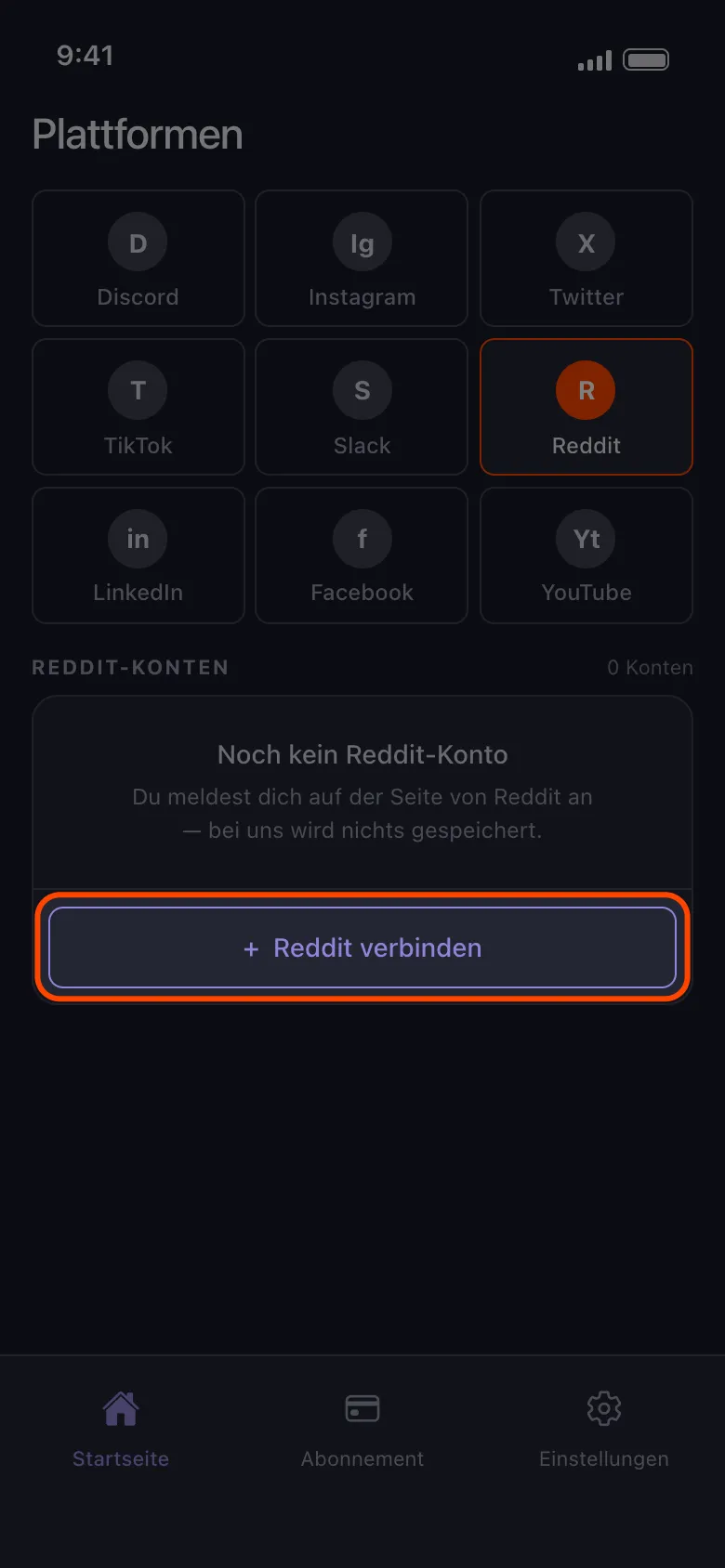
Tippe auf die Schaltfläche zum Verbinden oder auf „Weiteres Konto hinzufügen“
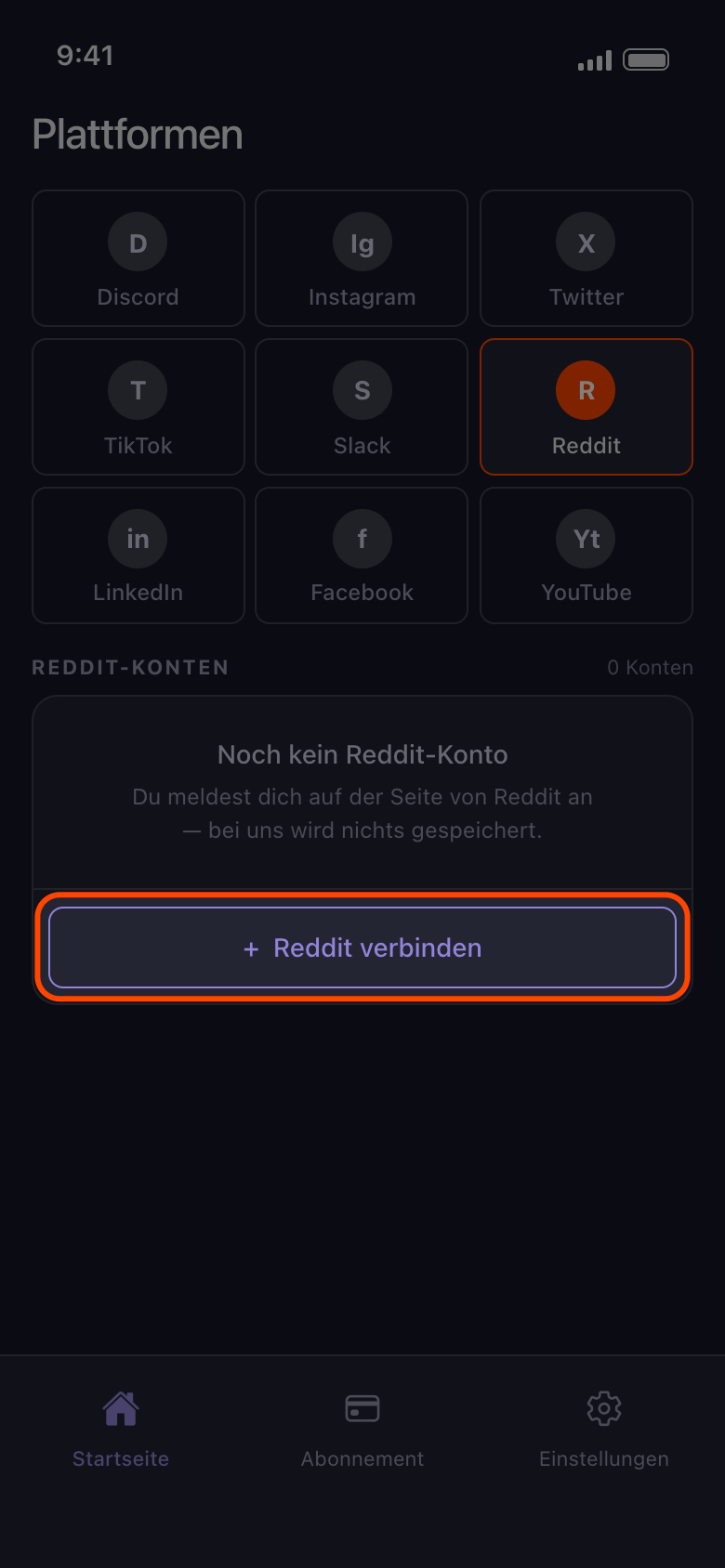
Öffne den Tab „Startseite“, wähle die Plattform und tippe auf die Schaltfläche mit dem Namen der Plattform und „verbinden“ (hier „Reddit verbinden“) oder auf „Weiteres Konto hinzufügen“, wenn schon ein Konto da ist.
In der App Startseite → Reddit → Reddit verbinden
- 02
Melde dich mit Benutzername und Passwort an
Nutze das Formular auf der Anmeldeseite, die sich öffnet, samt Zwei-Faktor-Code oder Captcha, falls die Plattform danach fragt. Auf Android öffnen die Schaltflächen für die Anmeldung mit Google oder Apple deinen Browser, und eine Anmeldung, die dort endet, kommt nie bei Unpost an: Schließ den Browser, geh zurück zur Anmeldeseite und nutze das Formular mit Benutzername und Passwort. Hast du dich bisher immer mit Google oder Apple angemeldet, leg zuerst ein Passwort fest, meist über den Link „Passwort vergessen?“ der Plattform. Fragt Google auf dem iPhone nach einem Passkey, wähle eine andere Anmeldemethode und gib dein Google-Passwort ein.
In der App Reddit verbinden → Anmeldeseite von Reddit
- 03
Warte, bis sich die Seite von selbst schließt
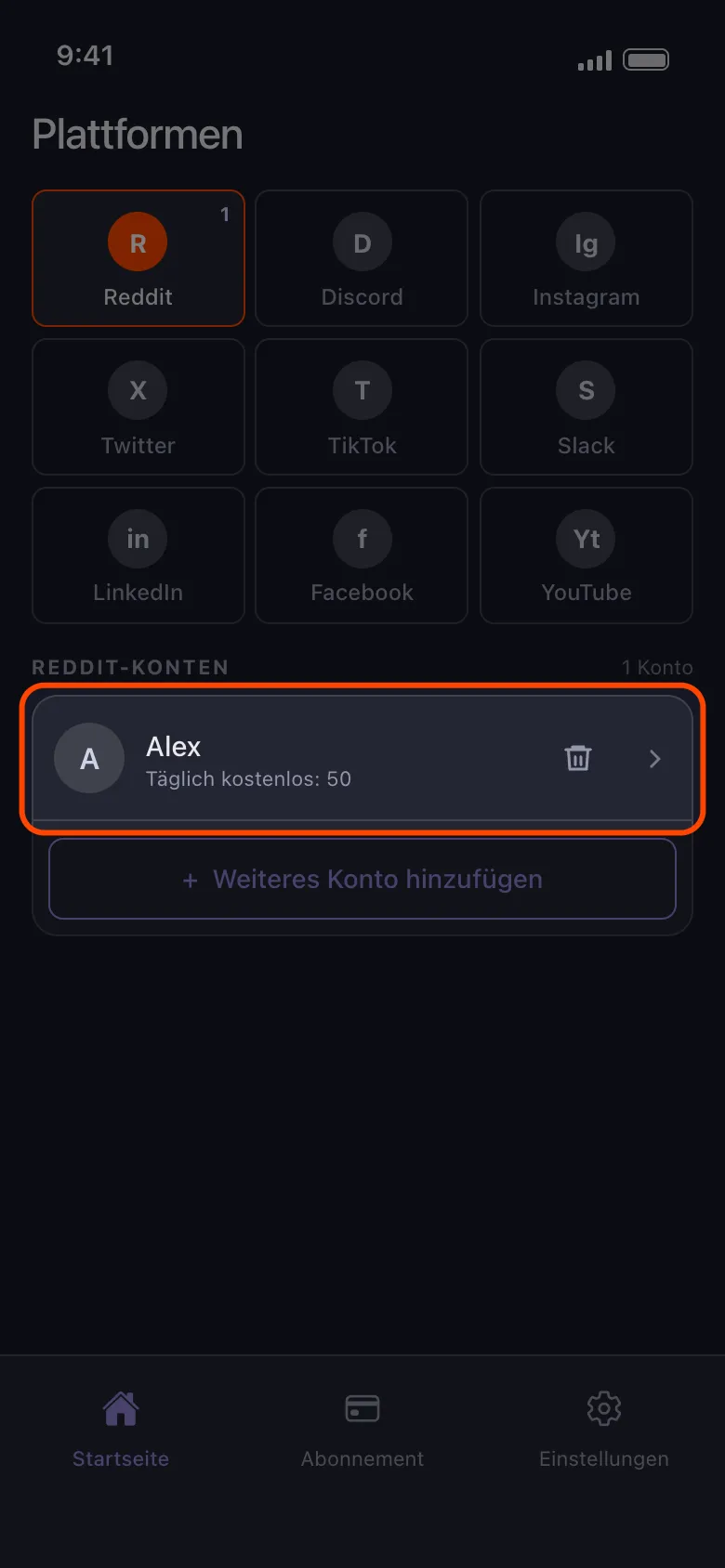
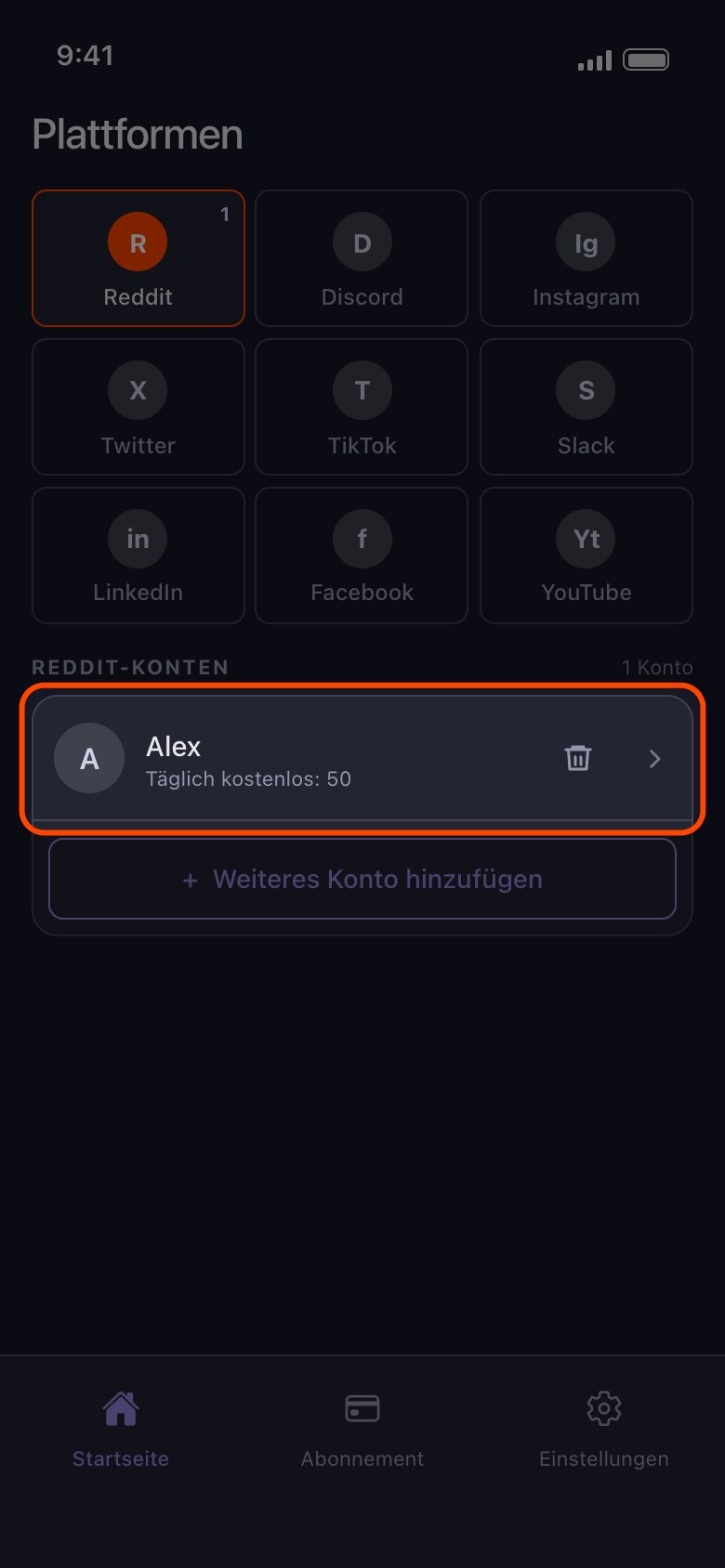
Ist die Anmeldung abgeschlossen, schließt Unpost die Seite, und das Konto erscheint in der Liste. Lädt die Seite länger als ein, zwei Minuten, tippe auf den Zurück-Pfeil und versuch es noch einmal. Schließt sie sich, aber es erscheint kein Konto, tippe erneut auf „Reddit verbinden“. Die Anmeldung verbindet das Konto nur: Zum Löschen tippst du darauf und wählst aus, was weg soll (siehe „So fügst du ein Konto hinzu und startest deine erste Bereinigung“).
In der App Startseite → Reddit
- 04
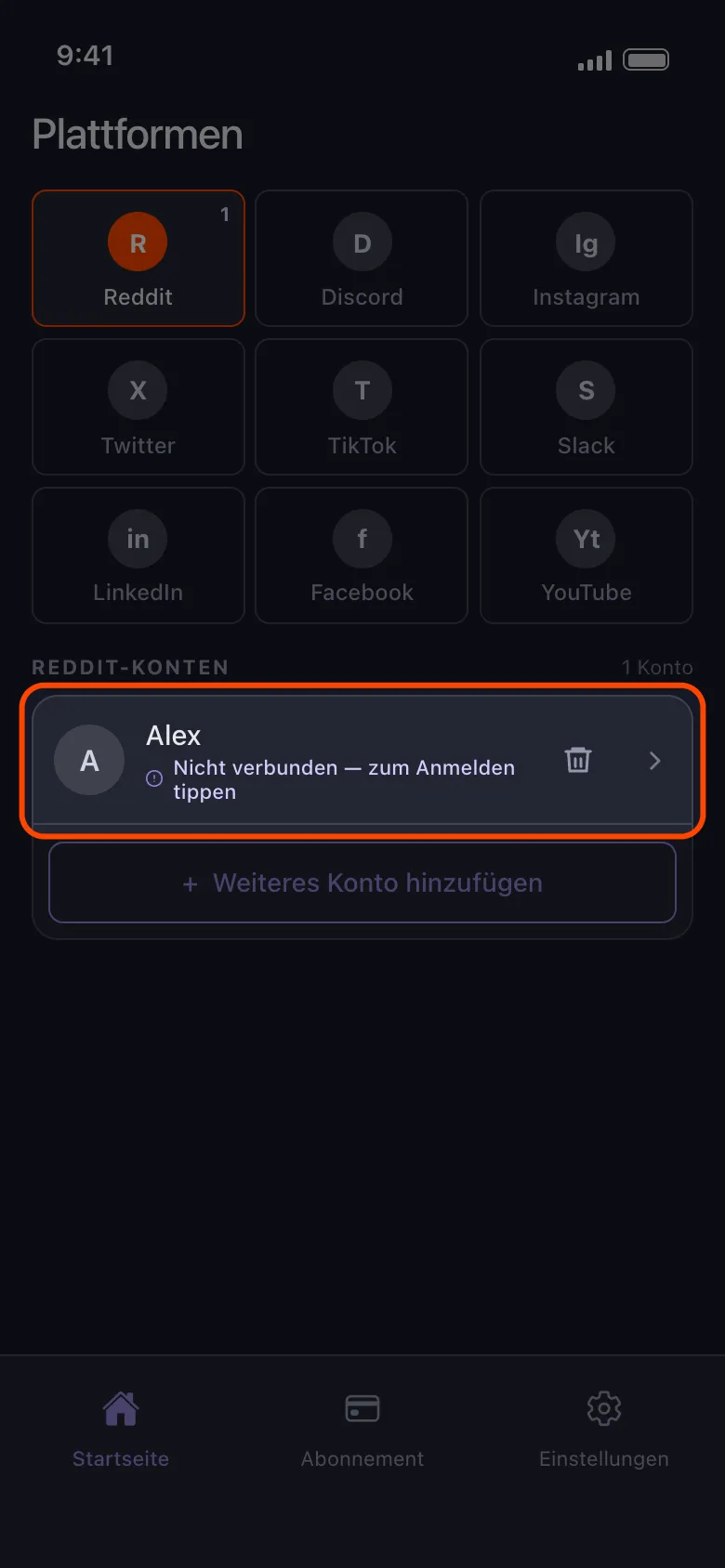
Ist ein Konto nicht verbunden, tippe darauf
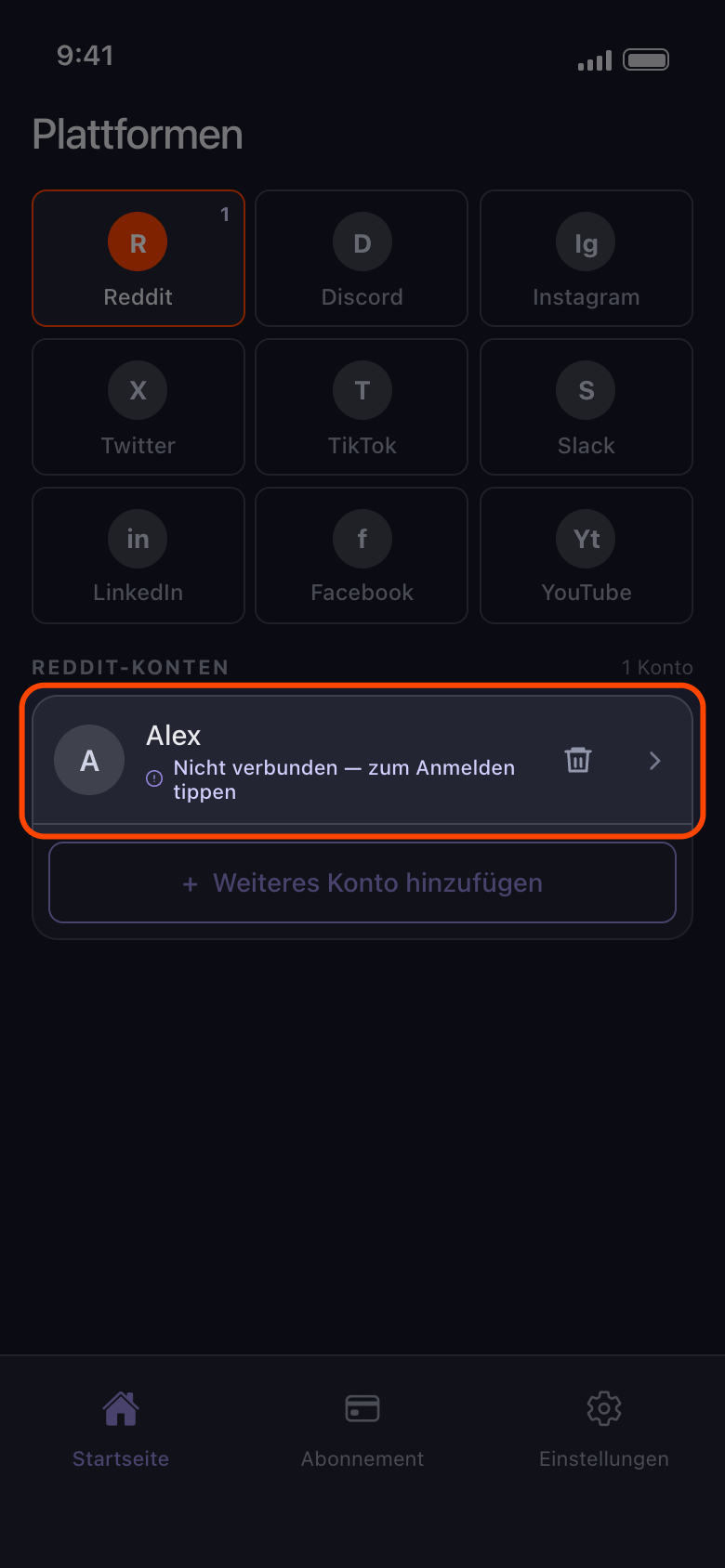
Die Plattform hat die Anmeldung beendet, die Unpost für dieses Konto aufbewahrt. Dass du in der App der Plattform angemeldet bist, etwa bei TikTok, ändert daran nichts: Unpost hat auf diesem Handy seine eigene Anmeldung. Tippst du auf die Zeile, öffnet sich die Anmeldeseite für dieses Konto. Meldest du dich beim selben Konto an, wird die Zeile aktualisiert statt doppelt angelegt; bei mehreren Konten rutscht sie ans Ende der Liste. Ein anderes Konto kommt als neue Zeile dazu, und die Zeile mit „Nicht verbunden — zum Anmelden tippen“ bleibt, bis du sie entfernst.
In der App Startseite → Reddit → Nicht verbunden — zum Anmelden tippen
- 05
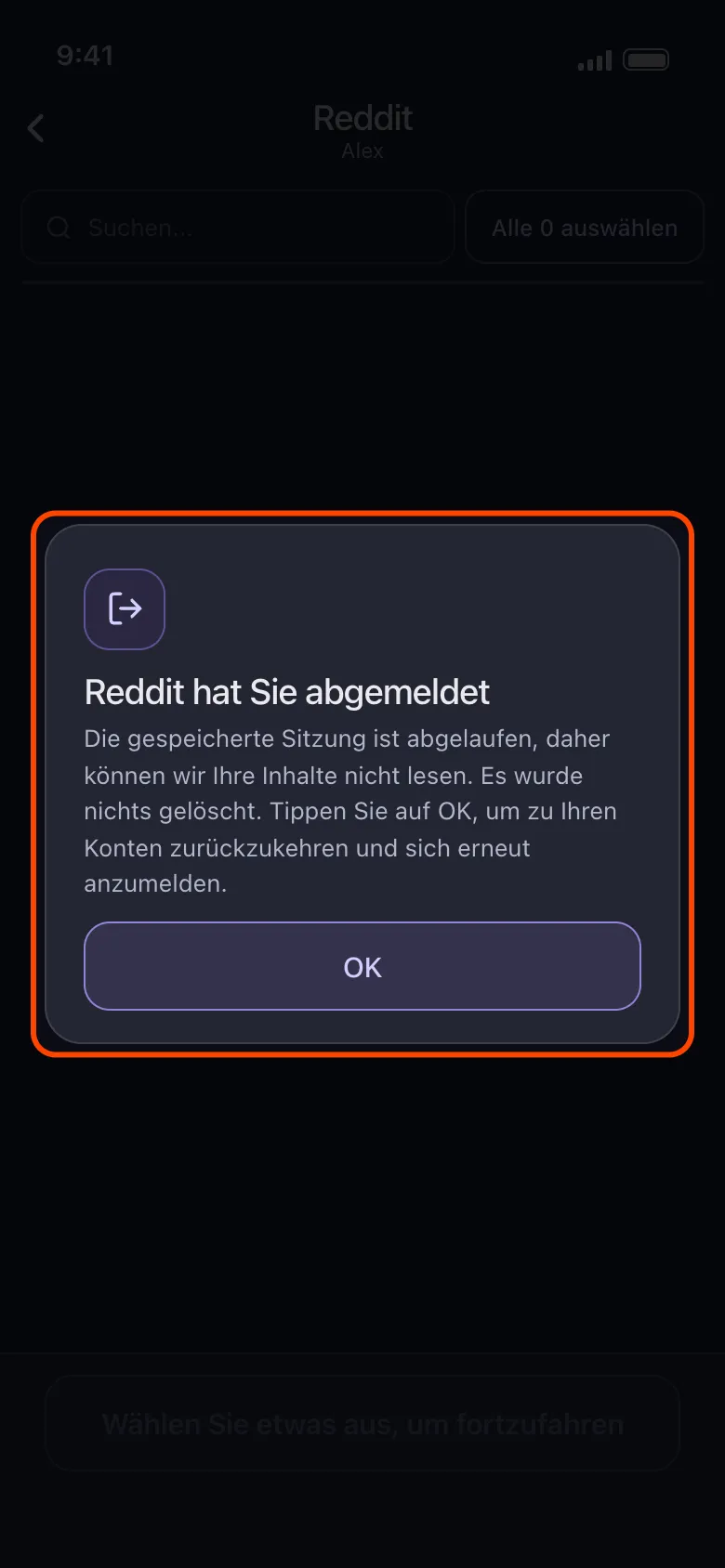
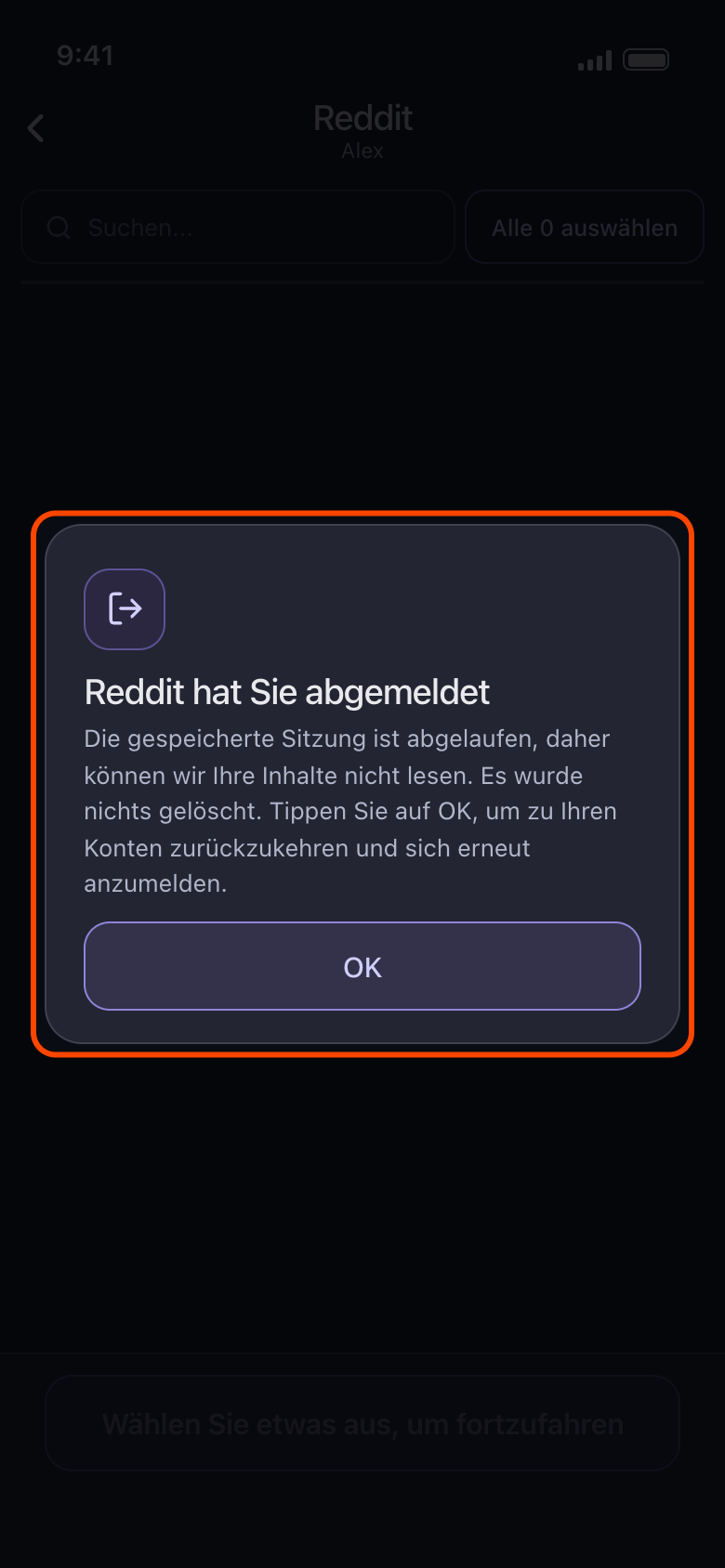
Siehst du „Reddit hat Sie abgemeldet“, tippe auf „OK“
Die Anmeldung war abgelaufen, als du das Konto geöffnet hast, und es wurde nichts gelöscht. „OK“ bringt dich zurück zu deinen Konten, wo in der Zeile jetzt „Nicht verbunden — zum Anmelden tippen“ steht. Tippe darauf und melde dich erneut an. Hat ein Durchlauf gestoppt, weil die Plattform das Konto abgemeldet hat, sagt das stattdessen der Ergebnisbildschirm: Tippe auf der Startseite auf die Zeile des Kontos, melde dich erneut an und starte den Durchlauf noch einmal.
In der App Startseite → Reddit → Konto → Von Reddit löschen → OK
- 06
Klappt es mit einem Konto immer wieder nicht, aktualisiere Unpost und füge es neu hinzu
Aktualisiere Unpost zuerst auf die neueste Version (die Version steht ganz unten in den Einstellungen). Klappt es dann immer noch nicht, entferne das Konto, füge es neu hinzu und starte einen neuen Durchlauf (siehe „So entfernst du ein Konto aus Unpost“); auf Discord, X und Reddit löscht das Entfernen auch das importierte Datenpaket des Kontos, importiere es also erneut. Lehnt X schon die Anmeldung ab, melde dich zuerst in der X-App bei diesem Konto an und versuch es später noch einmal in Unpost.
Gut zu wissen
- Jede Anmeldeseite öffnet sich abgemeldet, nicht mit einem anderen Konto angemeldet, deshalb fragt die Plattform vielleicht jedes Mal nach deinem Zwei-Faktor-Code.
- Bei YouTube meldest du dich auf Googles eigener Seite an. Eine Anmeldung fügt das Google-Konto hinzu, dann erscheint jeder Kanal mit Brand-Konto und jeder Kanal, den es nur verwaltet, als eigene Zeile: siehe „YouTube: mit Google anmelden und den richtigen Kanal wählen“.
- Auf Instagram kann ein Konto, das mit dem angemeldeten verknüpft ist, von selbst erscheinen, mit „Nicht verbunden — zum Anmelden tippen“. Tippe darauf, um dich auch bei diesem Konto anzumelden, oder entferne es mit dem Papierkorbsymbol. Für ein anderes Instagram-Konto nimm „Weiteres Konto hinzufügen“, nicht eine solche Zeile. Bleibt die Anmeldung im Instagram-Feed hängen, meldet dich sofort ab oder fragt nach dem Geburtstag, siehe „Instagram lässt sich nicht verbinden: bleibt im Feed hängen, meldet dich ab oder fragt nach dem Geburtstag“.
- „Unpost kann nicht gestartet werden“ statt der Anmeldeseite heißt, dass Unpost nicht laden konnte, was es braucht: Tippe auf „Erneut versuchen“, und wenn es weiter scheitert, prüfe deine Verbindung oder aktualisiere Unpost; deine Konten bleiben, wie sie sind. Erscheint die Meldung auf Android direkt nach dem Tippen auf eine Verbinden-Schaltfläche oder ein Konto, siehe „Warum Unpost auf einem gerooteten Handy oder Emulator stoppt“. Eine Fehlermeldung statt der Anmeldeseite heißt, dass die Seite der Plattform nicht geladen wurde: Prüfe deine Verbindung und versuch es erneut.
- Auch Reddit-Konten zeigen „Täglich kostenlos: 50“, aber Reddit hat kein Tageslimit.
- Kommst du nicht weiter? „Einstellungen“ → „Support kontaktieren“ öffnet eine E-Mail an contact@unpost.app. Schreib, um welche Plattform es geht und was die Anmeldeseite gezeigt hat.
Weitere Anleitungen