
How to Delete All YouTube Activity: Comments, Likes, Videos
To delete all YouTube activity, you need three routes, because YouTube has no single button for it. Google’s My Activity clears watch and search history in one go. Comments, replies, likes, live chat messages and subscriptions go one item at a time, and your uploads go from YouTube Studio. A bulk-delete app can clear all of those but search history in one run from your phone.
What “all YouTube activity” covers before you delete it
The activity a YouTube account collects falls into four groups:
- Reactions: likes and dislikes on videos, and likes and dislikes on comments.
- What you wrote: comments, replies and live chat messages.
- History and subscriptions: watch history, search history and the channels you subscribe to.
- Your channel’s uploads: videos, Shorts and the comments other people left under them.
What you wrote and what you uploaded carry your channel name in public, where anyone can read them, so they are usually the reason to clean up a YouTube account.
Clear watch and search history in one go
Watch and search history are the only kind of YouTube activity with a delete-all button. On a computer or in a phone’s browser:
- Open Google’s My Activity (myactivity.google.com), signed in to the account, and choose YouTube History.
- Open the Delete menu and pick a custom range or all time.
- Confirm. Every entry in that range goes, searches included.
From the same page, auto-delete removes entries older than 3, 18 or 36 months on a schedule, and turning YouTube History off stops new entries from being saved. Turning it off deletes nothing already there.
None of this touches anything public. A deleted watch entry leaves every comment, like, subscription and upload exactly where it was.
What YouTube makes you delete one at a time
| Activity | Where YouTube lists it | How it goes |
|---|---|---|
| Comments and replies | My Activity’s YouTube comments page, linked from YouTube’s History page | One at a time |
| Live chat messages | My Activity’s live chat page, linked from the same History page | One at a time |
| Likes | The Liked videos playlist | One video at a time |
| Dislikes, comment likes and comment dislikes | On the video or the comment itself, once you find it again | One at a time |
| Subscriptions | Your subscriptions list | One channel at a time |
| Your videos and Shorts | YouTube Studio’s Content page | Several at once, by ticking them |
Apart from Studio’s batch tick, everything else is a click per item: even at five seconds an item, 1,000 comments is close to an hour and a half of clicking, before the likes and subscriptions.
Guides online fill that gap with browser extensions and scripts pasted into the browser console. Both run inside your signed-in YouTube session, so a script can do anything your account can, and one written for last year’s YouTube pages can stop working or click the wrong thing. Read every line of a script before you run it, or do not run it.
Back up your YouTube data with Google Takeout first
YouTube has no undo for a deleted comment, like, history entry or video. Before any bulk cleanup, export what you might want later:
- Open Google Takeout (takeout.google.com) and clear the preselected products.
- Tick YouTube and YouTube Music, then open its options to choose what goes in: history, comments, subscriptions, videos.
- Create the export. Google emails a download link once it is ready, which takes longer for a channel with many videos.
Keep the file somewhere other than the Google account you are cleaning. It is the only copy you will have.
Comments, likes, history, subscriptions and uploads in one run with Unpost
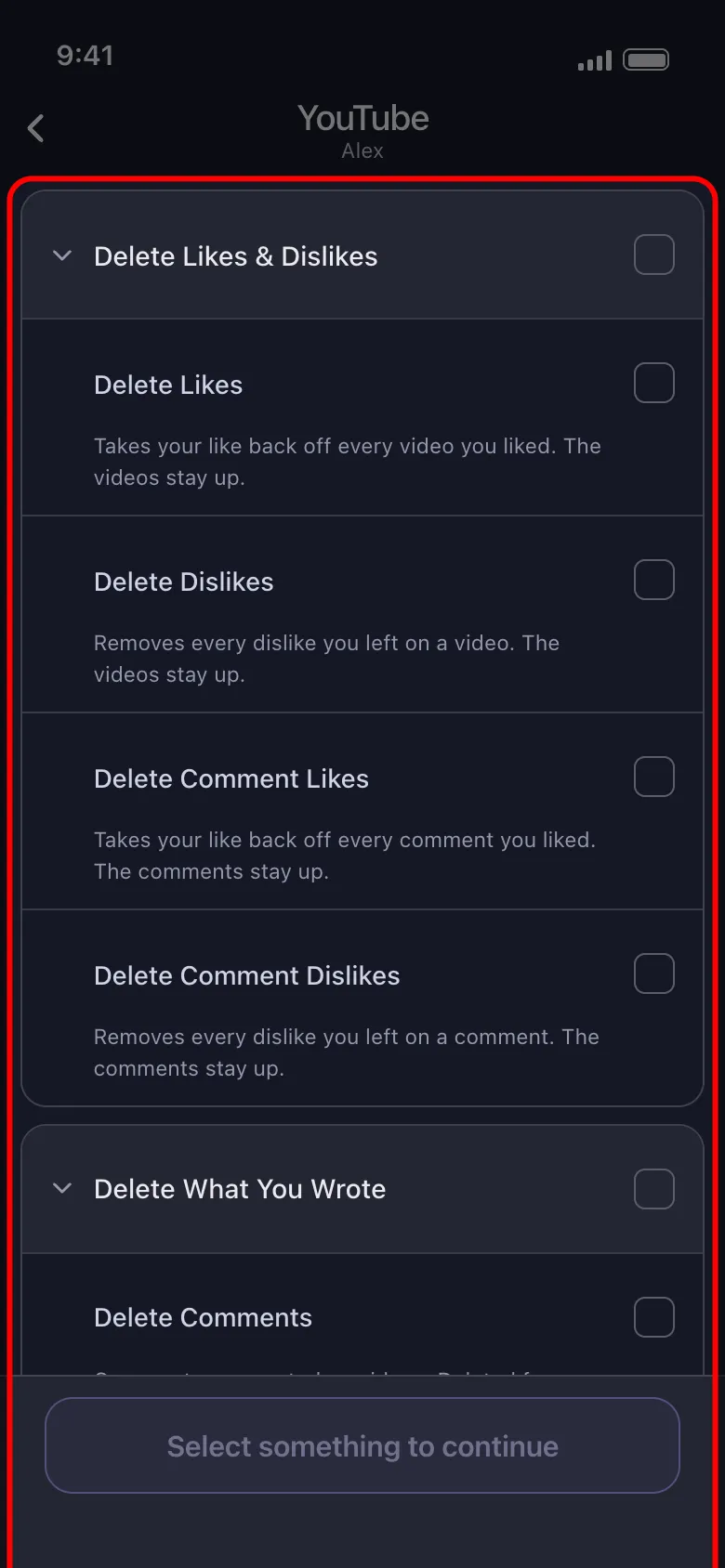
Unpost is a phone app for iOS and Android that can bulk delete posts, comments, messages and more, YouTube included. One run covers any mix of its twelve YouTube categories, grouped in the picker much as above:
- Delete Likes, Delete Dislikes, Delete Comment Likes and Delete Comment Dislikes
- Delete Comments, Delete Replies and Delete Live Chat Messages
- under Delete History & Subscriptions: Delete Watch History and Unsubscribe from Channels
- under Delete Your Videos: Delete Videos, Delete Shorts and Delete Comments on Your Videos and Shorts
You sign in on Google’s own page (accounts.google.com), opened inside the app, so the password goes to Google and never into an Unpost form. The session stays on your phone in encrypted storage, and every deletion request goes to YouTube’s and Google’s own hosts, never through an Unpost server. The app does run analytics, session-replay and crash-reporting tools, so it is not a no-data app.
-
Download Unpost from the App Store or Google Play.
-
Open it, pick a language, then tap Continue under the privacy policy.
-
Without Premium, Unpost opens on its Subscription tab: tap Main in the bottom bar.
-
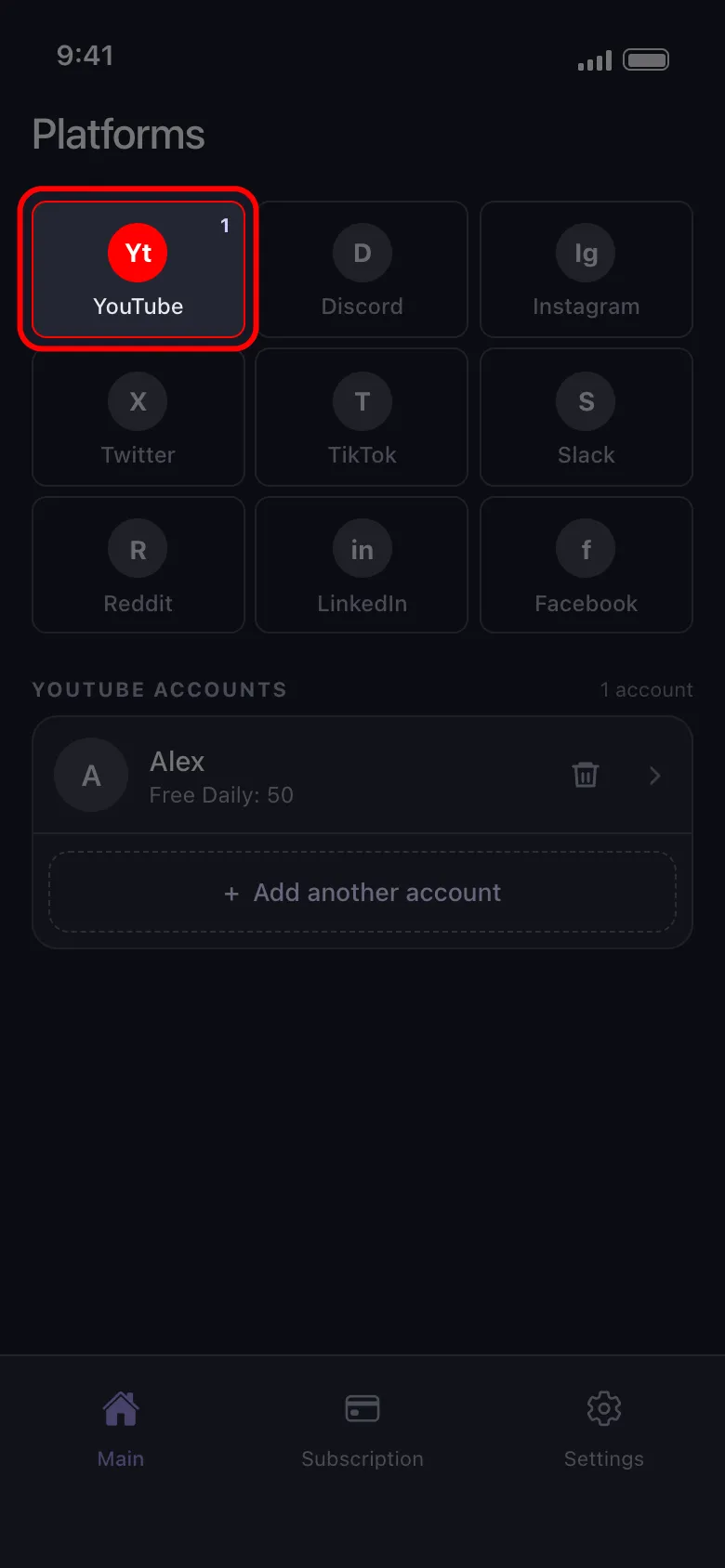
Tap the YouTube tile, then the button under it that reads Connect YouTube, and sign in on Google’s page.
-
Tap the connected account, pick the categories, set the options, then tap Delete.
-
Read the rules the app shows and tap Got it. They warn that deletion is permanent and that the app keeps no backup. Keep the app open until the run ends (in the foreground on an iPhone; on Android it can run in the background, but not closed) and stay off the YouTube account meanwhile.
Choose what stays: date range, keywords and video filters
“Delete everything” can become “delete everything before 2022” or “delete every comment that names my old school.” Two options apply to the whole run:
- Select Date Range limits the run to a period. Subscriptions carry no date, so a date range skips them.
- Delete by Keywords matches the video title, the channel name or the text you wrote. An item with none of them is skipped.
Three more filters apply only to Delete Videos, Delete Shorts and Delete Comments on Your Videos and Shorts, and to none of the other categories:
- bounds on likes, comments and views;
- the visibility: public, unlisted, private or draft;
- what YouTube records about a video (made for kids, paid promotion, AI or altered content), each set to Yes, No or All. These are YouTube’s own disclosures, not a reading of the content, and Yes or No skips a video whose value is unknown.
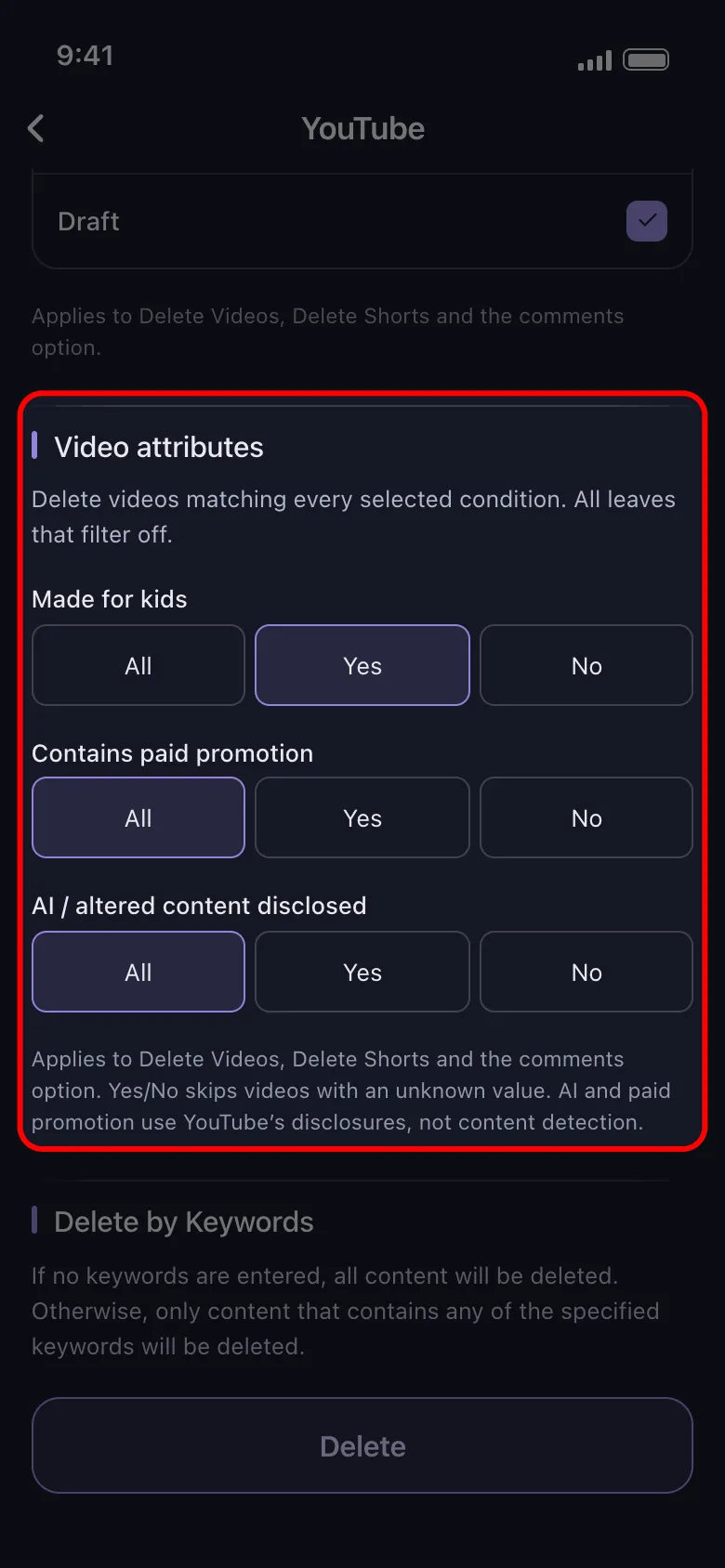
A worked example: to clear public uploads that never passed 100 views while keeping the rest of the channel, pick Delete Videos and Delete Shorts, set the visibility to public and the views to a maximum of 100.
Limits: managed channels, the daily cap and the pace
A channel your account manages but does not own gets three categories only: Delete Videos, Delete Shorts and Delete Comments on Your Videos and Shorts. Its likes, dislikes, comments, replies, live chat messages, watch history and subscriptions stay out of reach.
Free accounts get 50 deletions per connected account per day. The day counts in UTC, by the server’s clock rather than your phone’s, and a run stops when the 50 are used and the rest waits for the next UTC day. At that rate, 2,000 comments and likes take 40 days. Unpost Premium, a monthly subscription through the App Store or Google Play, removes the cap on every platform.
Deletion is slow on purpose, to protect the account from a ban. And search history is not among the twelve categories: clear it with the My Activity steps above.
What is left after you delete all your YouTube activity
Even a complete run leaves a few things in place:
- The channel itself. An emptied channel keeps its name, picture and subscribers. Deleting it is a separate setting in your YouTube account, and a separate decision.
- Playlists and channel posts. Playlists you created and posts on your channel are deleted from their own pages on YouTube.
- Copies elsewhere. Replies that quote you, screenshots, reuploads of your videos and web archives sit beyond any delete button you control.
- Google activity outside YouTube. Searches on Google, Maps and other Google services sit under Web & App Activity in My Activity, with the same range and auto-delete options.
- Your other accounts. The same trail of comments and likes builds up wherever you post, and cleaning up your digital footprint platform by platform covers where to start.
Export with Takeout today, then download Unpost and pick the categories you want gone: 50 deletions a day free, no daily cap with Premium.
Frequently Asked Questions

Get Started
Delete Old Content Across Your Accounts
Bulk delete messages, posts, likes, comments, DMs, reactions, bookmarks, followers, and more — all from one app.
No password storage • Free to start • iOS & Android
 Download for iOS
 Download for Android