
Post Deleter for Instagram: Best Way to Delete Multiple Posts Faster
Reviewed by Unpost Team
A post deleter for Instagram is usually a faster workflow for removing many posts, not a one-tap promise to erase your whole profile instantly. Instagram typically lets you delete one post manually and, for many users, remove a moderate batch through Your Activity. That native route is fine for smaller jobs. If you need to delete multiple posts on Instagram by date, likes, or comments, Unpost is usually the more practical option. Unpost is a mobile app for iOS and Android that supports bulk deletion of Instagram posts, reels, and carousels, with filters that make larger cleanup passes easier to control.
If you only need the manual Instagram steps, start with how to delete Instagram posts, photos, reels, and carousels. If posts are only one part of a wider reset, the Instagram cleanup guide covers the bigger picture.
| Method | Best for | What it does well | Where it slows down | When Unpost is better |
|---|---|---|---|---|
| Delete one post manually | One-off cleanup | Fast and built into Instagram | Repeating it many times is tedious | You are removing a backlog, not one item |
| Instagram multi-select in Your Activity | Small to moderate batches | Lets you sort and select several items in one pass | You still do the review manually | You want filters beyond a simple list review |
| Unpost for posts, reels, and carousels | Larger cleanup jobs | Lets you narrow the job by date range, likes range, or comments range | Requires keeping the app open while the run finishes | You want targeted, repeated, or higher-volume cleanup |
What People Mean by a Post Deleter for Instagram
Most people searching post deleter for instagram are not asking where the Delete button lives. They already know manual deletion exists. The real problem is that removing many older posts one by one is slow, repetitive, and easy to put off.
In practice, an Instagram post deleter usually means one of three things:
- A way to remove several posts in one session instead of opening each item separately.
- A way to focus on a specific slice of content, such as old launch-week posts or low-engagement uploads.
- A way to repeat cleanup over time without starting from scratch every time.
That is why search phrases like how to mass delete instagram posts, how to delete multiple instagram posts, and how to delete multiple pictures on instagram all point to the same need: a faster cleanup workflow with more control.
What This Does and What This Does Not Do
What this does
- Explains what Instagram can usually handle natively for post cleanup.
- Shows when a dedicated tool becomes the better option for bulk cleanup.
- Shows how Unpost can bulk delete Instagram posts, reels, and carousels with practical filters.
What this does not do
- It does not claim that every Instagram version uses the exact same labels or menus.
- It does not claim Unpost deletes Stories, deactivates accounts, or performs unsupported Instagram actions.
- It does not promise a reckless one-tap “delete everything” shortcut without reviewing what you selected.
Native Instagram Method
Instagram deserves the first mention because the native method is good enough for many smaller jobs. If you only need to remove one post, photo, reel, or carousel, Instagram’s own delete flow is usually the fastest answer. Many users also have a multi-select route through Your Activity, which can be enough for a moderate batch if you already know what should go.
This is usually the practical native answer to how to delete multiple posts on Instagram:
- Open your profile and go to Your Activity.
- Open your posted content section.
- Use Sort & Filter if Instagram shows it.
- Select the posts, reels, or videos you want to remove.
- Delete the selected items.
If you want the full manual walkthrough, including single-item deletion, go to how to delete Instagram posts, photos, reels, and carousels.
Native Instagram works well when:
- You already identified the posts you want gone.
- The cleanup is small enough to review manually.
- You do not need to filter by engagement signals before deleting.
Native Instagram becomes less efficient when:
- The backlog spans months or years.
- You want to target weak-performing content instead of scrolling a long list.
- You plan to run several cleanup passes, not just one.
When Unpost Is Better
Unpost is better when the task stops being “delete one post” and starts being “clean up a whole section of my account.” On Instagram, Unpost supports bulk deletion of posts, reels, and carousels. The main advantage is not just speed. The main advantage is being able to narrow the job before you delete anything.
That matters if you are rebranding, cleaning old low-engagement content, or trying to make a profile feel current again without deleting blindly. Instead of asking only how to mass delete instagram posts, you can decide which period or performance band actually needs cleanup.
If that is the real job, Try Unpost. It is a mobile app for iOS and Android built for bulk social media cleanup, and on Instagram it also supports deleting DMs, likes, and comments, plus unfollow all and remove all followers.
How Unpost Works for Instagram Post Cleanup
The product-led workflow is straightforward:
-
Install Unpost on iOS or Android.
-
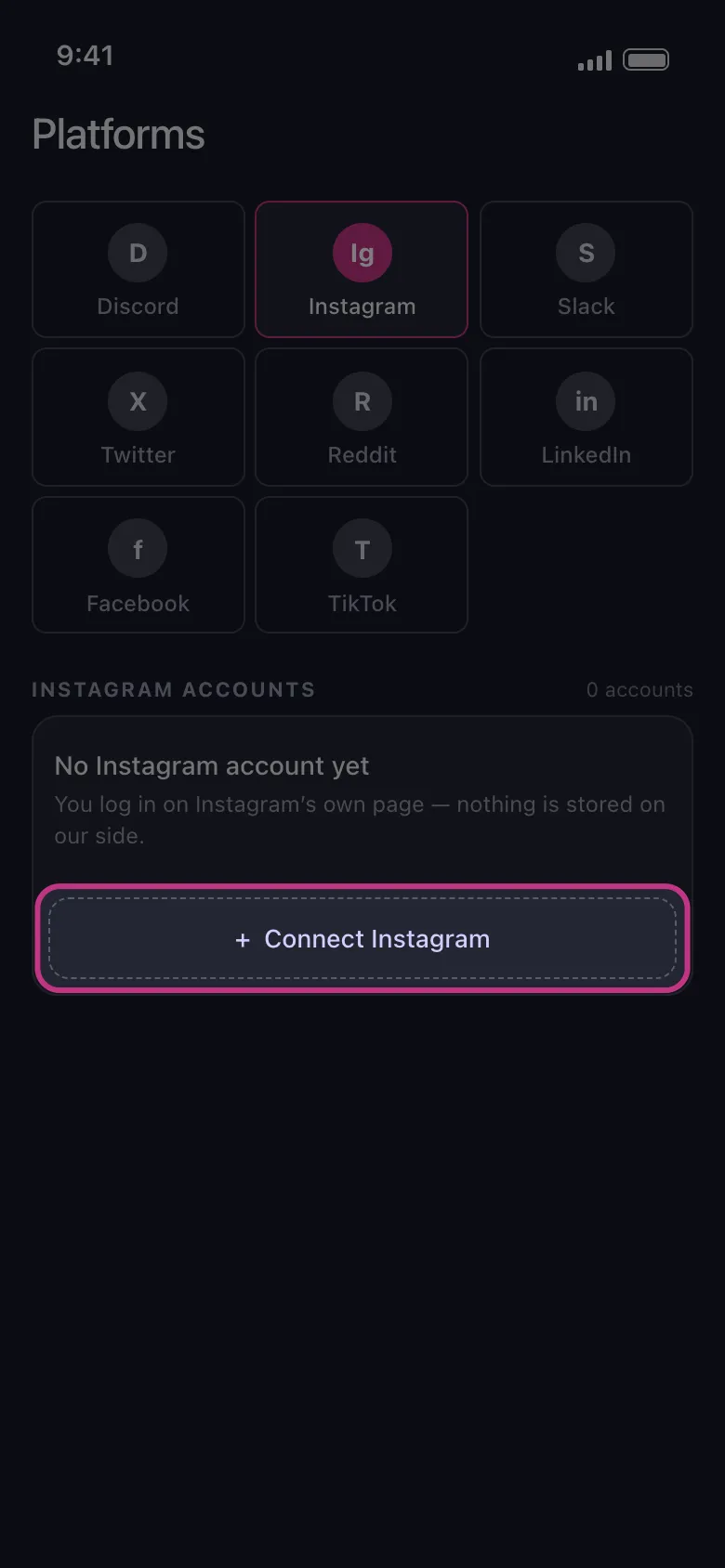
Add your Instagram account through Instagram web login in the embedded browser.
-
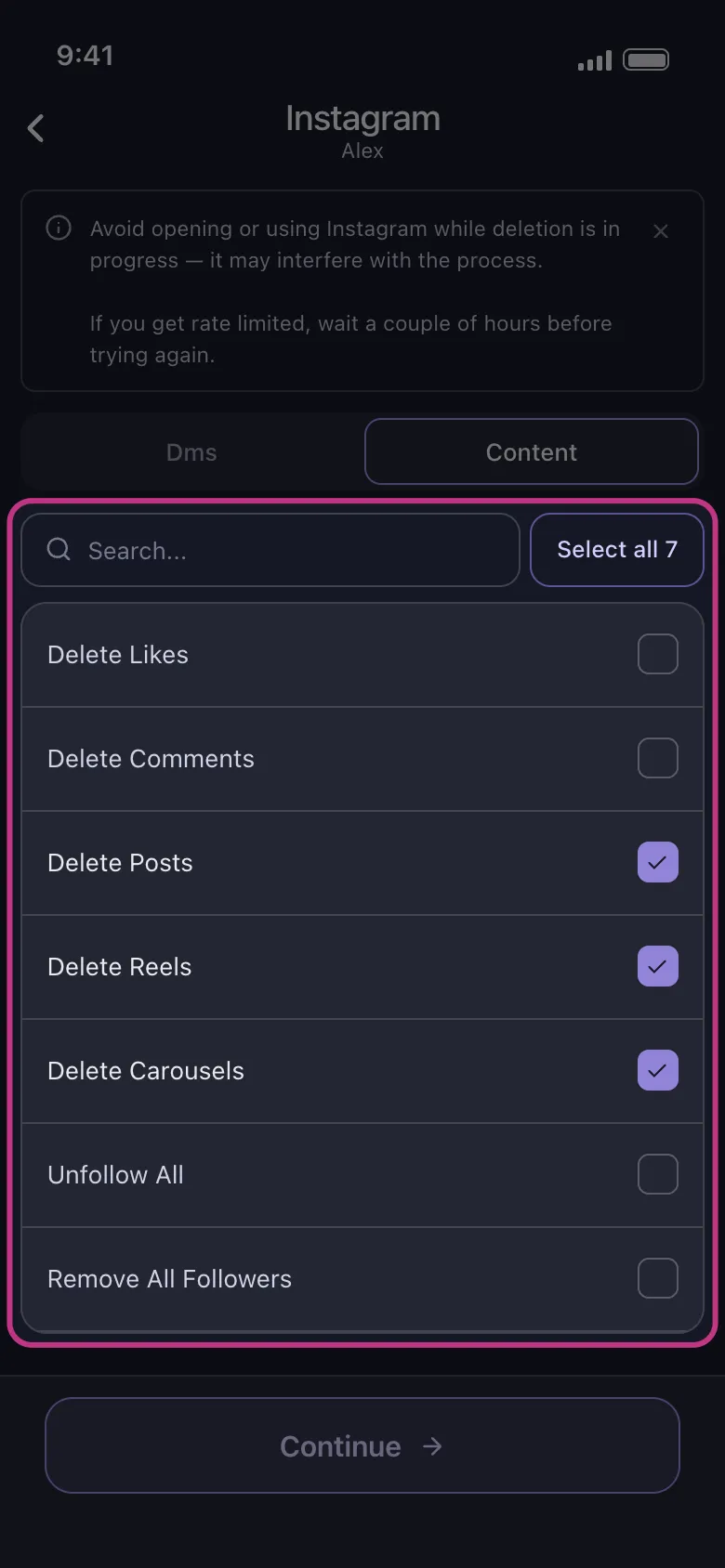
Choose the content type you want to clean up: posts, reels, or carousels.
-
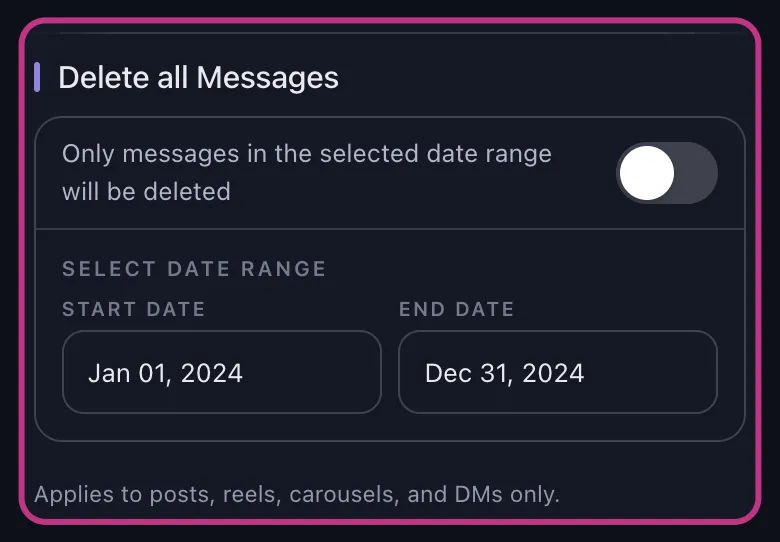
Apply filters if you want a narrower deletion pass.
-
Start the deletion run and keep Unpost in the foreground while it works.
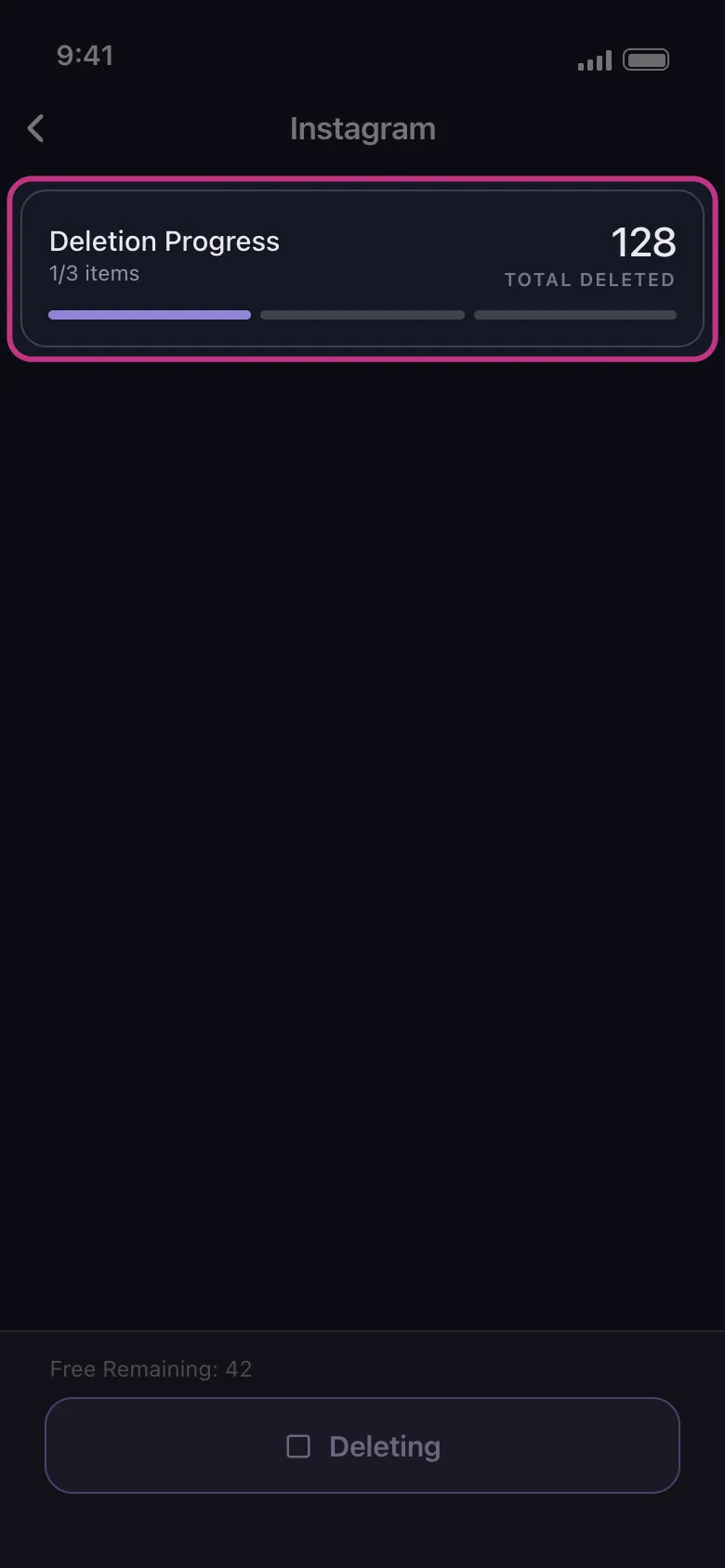
Unpost does not ask you to paste your Instagram password into the app. It connects through Instagram web login in an embedded browser and stores encrypted session data locally on your device. That is the practical privacy detail most people actually care about before starting a large cleanup job.
Manual Deletion vs Tool-Assisted Cleanup
If your search is transactional, the real decision is not whether Instagram has a Delete button. The real decision is whether the native workflow is still efficient enough for your backlog.
Use native Instagram when:
- You only need to remove one post or a very small batch.
- You already know exactly which items should go.
- Instagram’s own multi-select view is enough.
Use Unpost when:
- You want filters before deletion, not just manual selection.
- You are cleaning posts, reels, and carousels across a larger backlog.
- You expect to do repeated cleanup passes over time.
- You want one mobile workflow for post cleanup plus adjacent tasks like comments or likes.
Filter-Driven Cleanup Workflows
The strongest reason to use a dedicated Instagram post deleter is not volume alone. It is selective volume.
For Instagram posts, reels, and carousels, Unpost supports these filters:
- Date range
- Likes range
- Comments range
Those filters make the cleanup more useful than a blind sweep. Here are four realistic ways people use them.
Delete old posts from a specific period
If your grid still has content from an earlier brand identity, old event season, or a previous personal phase, a date range filter is the fastest way to isolate it. This is often the cleanest answer to how to delete multiple instagram posts without spending an hour scrolling back through your own archive.
Example workflow:
- Set a date range for the old period you want to clear.
- Review the matching posts, reels, or carousels.
- Run deletion only for that slice of content.
Remove zero-like posts without touching everything else
Some cleanup jobs are not about age. They are about quality control. If you are trying to refresh a feed, a likes range can help isolate posts that never landed, such as zero-like uploads, weak experiments, or stale placeholder content.
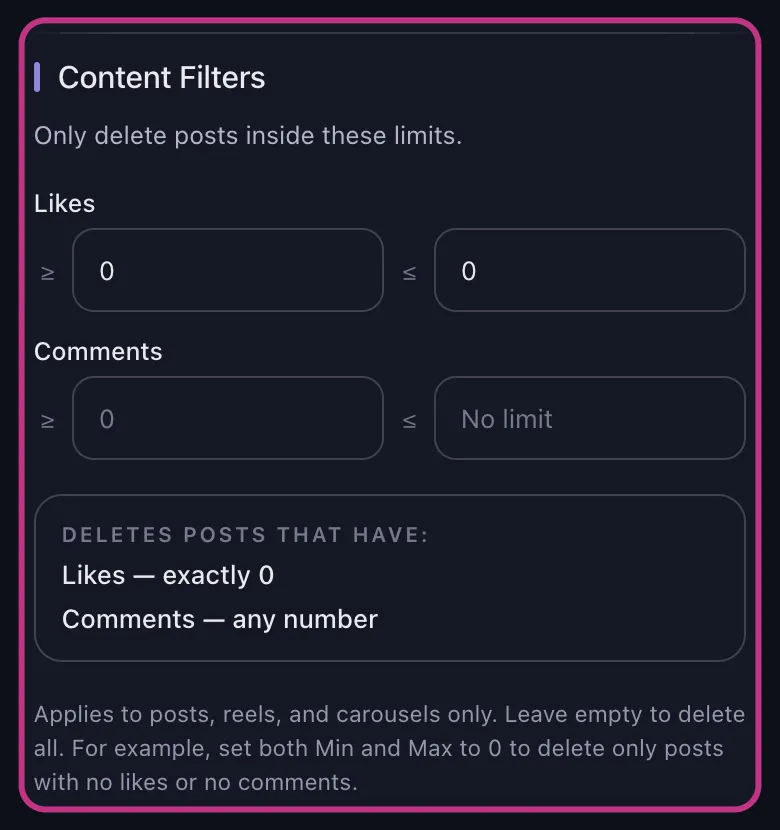
This is also where mass delete instagram posts becomes a more accurate phrase. You are not deleting randomly. You are deleting a defined group of lower-value posts.
Clean test reels after an experiment
Creators and brands often post test reels to try a format, hook, edit style, or promotion angle. A comments range or date range can help isolate those reels after the test period ends, so they do not keep cluttering the account long after the experiment is over.
The same logic works for carousels that were built for a short campaign and no longer fit the profile.
Remove launch-week content after a product or brand reset
Launch-week posts often age fast. Pricing graphics, teaser carousels, first-wave reels, or update posts can become noise once the campaign is over. A date range gives you a controlled way to clean that period up in one pass.
If your real question is how to delete all instagram posts, the practical answer is usually not to rush toward one giant wipe. Even if you want a near-total reset, working in clean, reviewable batches is usually safer and easier to verify.
Safety, Pace, and Practical Limits
Bulk cleanup works best when the process stays boring and predictable.
Keep these points in mind:
- Keep Unpost in the foreground while deletion runs.
- Do not actively use Instagram during deletion, because that can interfere with the process.
- Review your selection before you start, especially if you used broad filters.
- Stay patient if Instagram slows an action down.
If Instagram rate limits an action, the run may need to pause and retry before continuing. That is a practical workflow delay, not a reason to panic. The safest move is usually to keep the app open, avoid interrupting the session, and let the retry finish.
Best Option for Different Cleanup Goals
| Goal | Better fit | Reason |
|---|---|---|
| Remove one recent post quickly | Native Instagram | The built-in delete flow is simplest |
| Remove a small batch you already identified | Native Instagram | Your Activity is often enough |
| Mass delete Instagram posts from a certain period | Unpost | Date range filtering reduces manual scanning |
| Clean low-engagement posts without touching stronger ones | Unpost | Likes range and comments range make the cleanup more selective |
| Delete test reels and campaign carousels in batches | Unpost | The workflow is built for repeated content cleanup |
If you are cleaning more than posted content, the next useful reads are how to delete Instagram comments and how to delete likes on Instagram. Those tasks are separate from post deletion, but they often come up in the same cleanup session.
FAQ
Can Instagram mass delete posts without a tool?
Instagram typically lets many users delete a moderate batch through Your Activity and multi-select. That is often enough for a smaller cleanup session. A dedicated tool becomes more useful when you need better filtering, more control, or repeated passes across older content.
How do you delete multiple pictures on Instagram?
If those pictures are separate feed posts, Instagram usually lets you select multiple posted items through Your Activity. If the cleanup is larger, Unpost is more practical because it supports bulk deletion of posts, reels, and carousels with date, likes, and comments filters.
Does Unpost delete comments and likes too?
Yes, but as separate Instagram cleanup actions. Unpost supports deleting comments and deleting likes, in addition to deleting posts, reels, and carousels. If those are part of the same reset, use the deeper guides on how to delete Instagram comments and how to delete likes on Instagram.
What should I do if deletion pauses?
Keep Unpost open in the foreground and avoid using Instagram while the run is active. Instagram may occasionally slow or rate limit an action, which can cause a pause and retry. In most cases, the right move is to let the retry continue instead of interrupting the session.
Who Should Use Unpost Here?
Unpost is the best option here if your cleanup problem looks like any of these:
- You are removing dozens or hundreds of older posts.
- You want to clear low-engagement content without touching stronger posts.
- You need to clean up reels and carousels alongside standard feed posts.
- You are doing a rebrand, portfolio reset, or feed refresh and need more control than Instagram’s native list view gives you.
If you only have one or two items to remove, native Instagram is simpler. If you have a real backlog and want a cleaner way to work through it, Try Unpost.
Bottom Line
The short answer to post deleter for instagram is simple: Instagram can usually handle one-off deletion and moderate batch cleanup, but larger cleanup jobs get slow when you still have to review everything manually. That is why people search for a post deleter in the first place.
Unpost is the better fit when you want bulk deletion for Instagram posts, reels, and carousels with date range, likes range, and comments range filters. It keeps the job targeted, works on iOS and Android, and makes repeated cleanup more practical than tapping through old content one by one. For the native-only walkthrough, revisit how to delete Instagram posts, photos, reels, and carousels. For a broader account reset, go back to the Instagram cleanup guide.

Get Started
Delete Old Content Across Your Accounts
Bulk delete messages, posts, likes, comments, DMs, reactions, bookmarks, followers, and more — all from one app.
No password storage • Free to start • iOS & Android
 Download for iOS
  Download for Android