
How to Delete All Facebook Activity, Not Just Posts
To delete all Facebook activity, you need two tools, because Facebook has no single button for it. Its Activity Log can bulk-delete your posts by filter and send them to Trash. Likes, reactions, comments on other people’s posts and saved items come off one at a time, unless an app repeats the taps for you.
If one post is the problem, the three-tap method is in how to delete a post on Facebook. This page is for the whole history.
What counts when you delete all Facebook activity
“Activity” is everything Facebook logged about you, not only what sits on your timeline. Here is where each kind can be cleared in bulk:
| Activity | Activity Log: bulk? | Unpost |
|---|---|---|
| Your posts (text, photos, videos, reels) | Bulk: select, then Trash or Archive | Delete Posts group |
| Photos, albums and stories | One at a time | Delete Photos and Albums, Delete Stories |
| Comments you left on others’ posts | One at a time | Delete Comments You Left |
| Likes and reactions | One at a time | Delete Likes, Delete Story Reactions |
| Saved items | One at a time | Delete Saved Items and Collections |
| Posts and photos you’re tagged in | One at a time | Delete Activity You’re Tagged In |
| Trash | Empty it yourself, or wait 30 days | Empty Your Trash |
An old comment on someone else’s post is often more awkward than anything on your own profile.
How to clear your Facebook Activity Log in bulk with Manage activity
Menu names shift between versions, but the path is the same on the app and the desktop site:
- Open your profile, tap the ··· button, then Activity log.
- Open Manage activity and choose Your posts.
- Narrow the list with the three filters: Categories, Dates and People.
- Select the posts. The list loads a chunk at a time, so you select a page, act, then load more.
- Tap Trash to delete, or Archive to hide.
- Back in the Activity Log, open Trash and delete what is there.
For a few hundred posts this is workable. For a decade of posting, plus every like and comment, it is not.
Delete every other kind of activity with Unpost
Unpost is a phone app for iPhone and Android that can bulk-delete Facebook posts, comments, likes and more, category by category. The walkthrough:
-
Install Unpost from the App Store or Google Play.
-
Open it, pick the app’s language, then tap Continue under the privacy policy.
-
Without Premium the app opens on its Subscription tab: tap Main in the bottom bar.
-
Tap the Facebook tile, then the connect button under it, and log in on Facebook’s own page, which opens inside the app.
-
Tap your connected account.
-
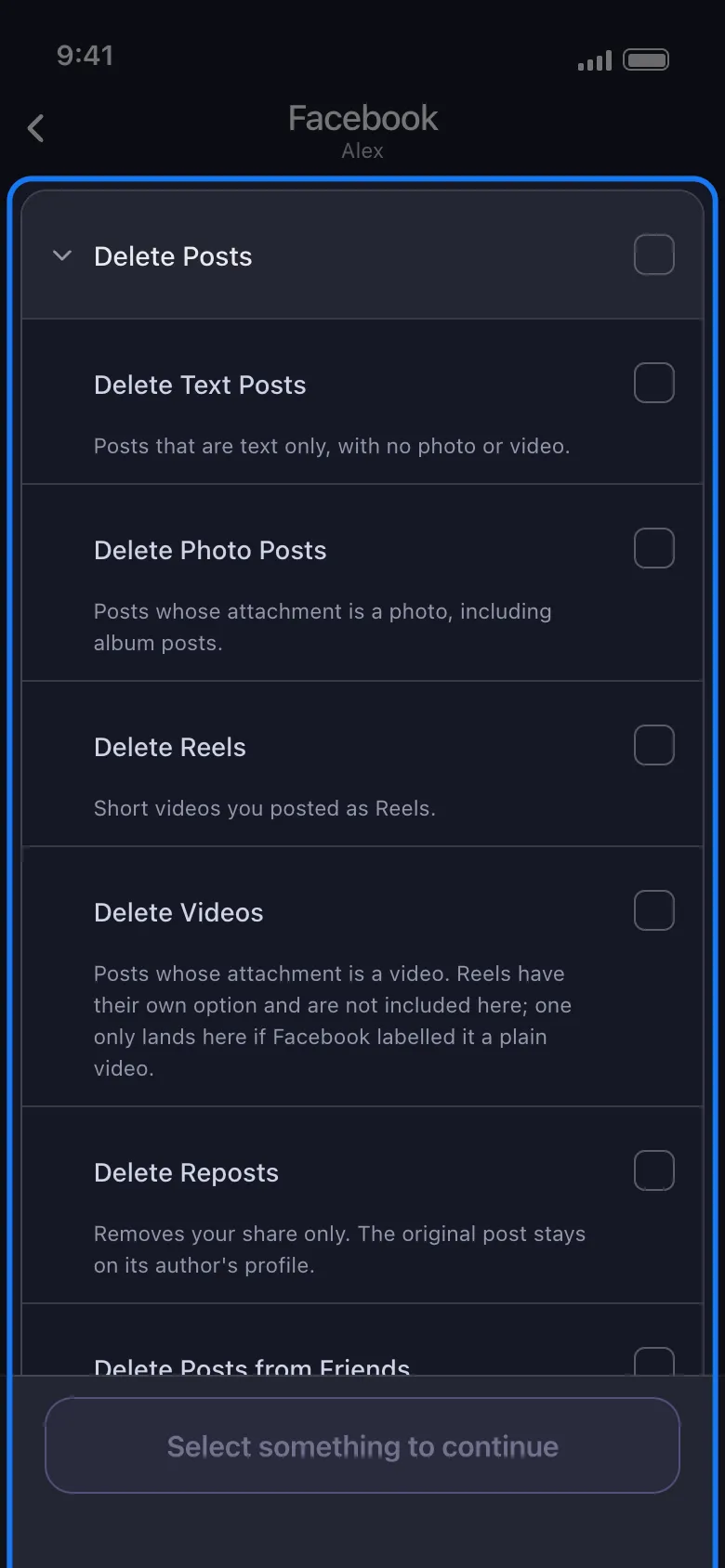
Pick what to delete from the five groups: Delete Posts, Delete Photos and Albums, Delete Stories, Delete Activity You’re Tagged In and Delete Comments, Likes and Saves. The same list holds Empty Your Trash and Delete Other Activity.
-
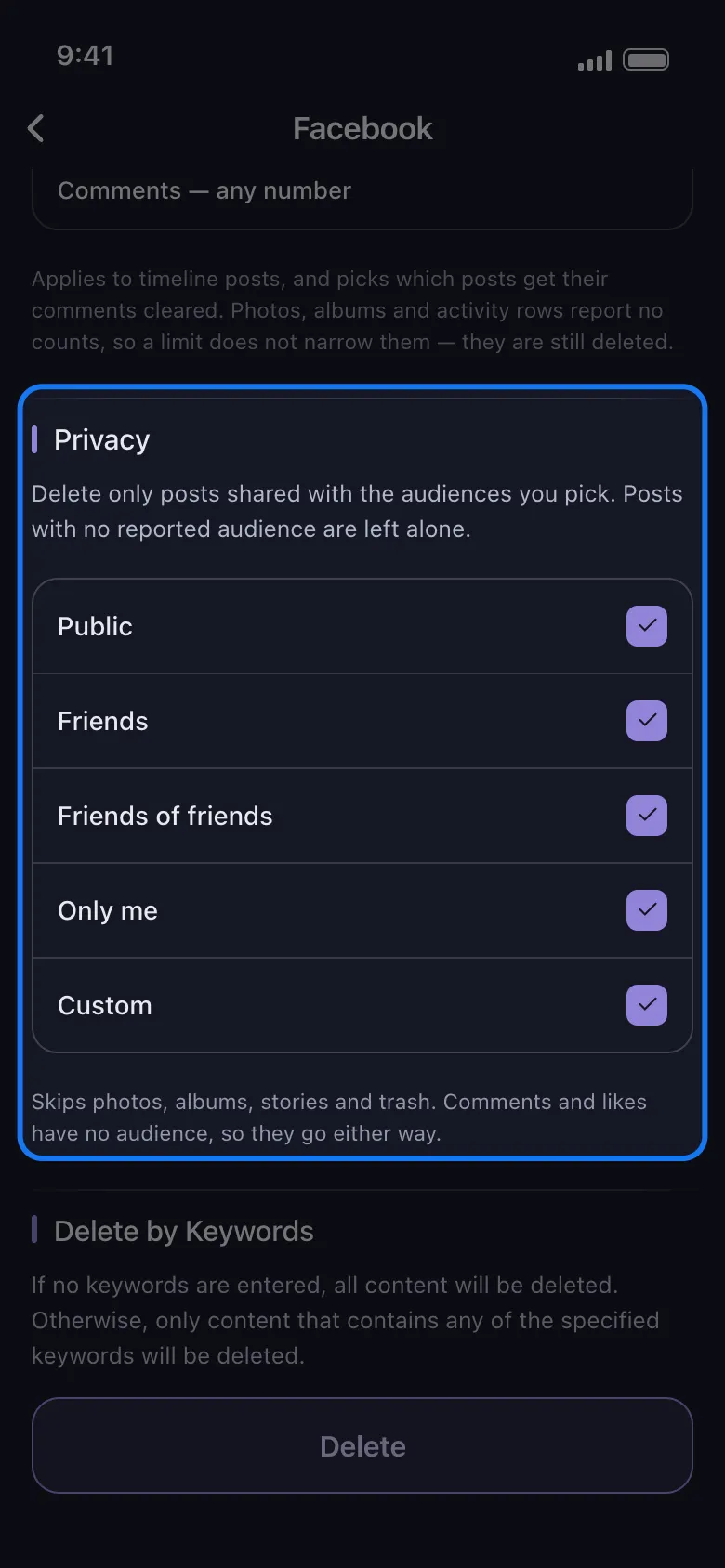
Set the options: a date range under Select Date Range, with a Start Date and an End Date; words under Delete by Keywords; the post’s audience under Privacy, or bounds on likes and comments.
-
Tap Delete.
-
Read the rules the app shows and tap Got it.
The run deletes item by item and shows its progress. Keep the app open: on an iPhone it must stay in the foreground, while on Android it carries on in the background and with the screen locked, but not if you close it. Do not use Facebook in the meantime. Deleting is slow on purpose, to protect the account from a ban.
Two limits to plan around. The keyword filter matches post and comment text only, so a photo with no caption is skipped. And a free account deletes 50 items per connected account per day (the day is counted in UTC); a Facebook history of thousands of likes and comments is where Premium, a monthly subscription that removes the cap, saves weeks of daily runs.
Archive, trash or delete: what each one leaves
- Archive hides a post from everyone but you. Nothing is deleted, and you can restore it.
- Trash removes the post from your profile and holds it for 30 days, then Facebook erases it. You can restore it during that window.
- Deleting from Trash, or the app’s Empty Your Trash, is final; the app warns before every run that deletion is permanent and keeps no backup.
Want a copy first? Request Facebook’s own download of your information before you start. Facebook is not one of the platforms where the app can delete from an export; that works on Discord, X and Reddit, as covered in deleting from a data package. A Facebook cleanup always runs against the live account.
What leaves your phone when the app deletes for you
A browser extension runs inside the browser where you are already logged in to Facebook; in the app you type your password on Facebook’s own page (www.facebook.com) inside it, not into a form of the app’s. The session Facebook issues is kept on your phone in encrypted storage, requests go to Facebook’s own servers, and deleted content never passes through an Unpost server.
What does leave the phone: the app downloads its instructions from unpost.app before a login and a run, keeps a per-account counter in its Firebase database (deletions left that day and totals, filed under a hash of your account ID), and ships Firebase Analytics and Sentry crash reporting.
Ready to clear more than posts? Get Unpost and start with the categories Facebook makes you delete one at a time.
Frequently Asked Questions

Get Started
Delete Old Content Across Your Accounts
Bulk delete messages, posts, likes, comments, DMs, reactions, bookmarks, followers, and more — all from one app.
No password storage • 50 free deletions a day per account • iOS & Android


Unpost is distributed only through the App Store and Google Play.