
How to Delete Comments on Facebook (Yours, and the Ones on Your Posts)
Two completely different jobs hide behind the same question. If you searched how do I delete Facebook comments, you either want the comments you wrote — under a friend’s photo in 2014, under a news article you should never have argued with — or you want the pile of comments other people left under your own post. Facebook keeps those in two separate places, and gives you a bulk tool for neither.
This guide covers both: the manual steps in the app and on the web, the part almost nobody explains — clearing the comments left on your posts, which you are allowed to do because the post is yours — and how to do either one in bulk when the pile is ten years deep. If it is the posts themselves you want gone rather than the conversation under them, start with how to delete a post on Facebook instead.
How do you delete Facebook comments?
Open the post, find the comment, and open its menu: press and hold the comment in the Facebook app, or hover over it and click the three dots on facebook.com. Choose Delete, then confirm. On a post you own you can delete any comment on it; anywhere else you can only delete comments you wrote yourself. Facebook has no select-all and no delete-all, so a long history means repeating those taps.
In the Facebook app (iOS and Android):
- Open the post the comment sits under.
- Scroll to the comment.
- Press and hold the comment until the menu appears — a few builds also show a small three-dot button beside it.
- Tap Delete.
- Confirm.
On facebook.com:
- Open the post.
- Hover over the comment.
- Click the three dots at its right-hand edge.
- Click Delete and confirm.
Finding your own old comments is the harder half. Comments do not sit on your profile the way posts do, so the only place that lists them together is your activity log: in the app, open the menu, then Settings & privacy, then Activity log; on facebook.com, open your profile, click the three dots next to Edit profile and choose Activity log. Then narrow the feed to Comments (labels move between versions — if the path differs, look for Your activity across Facebook). The list loads a screen at a time, newest first, and while some versions let you tick a handful of entries at once, none offer a select-all for a whole history.
Can you delete comments other people left on your posts?
Yes — on your own posts, and it needs no admin badge, no Page and no special account. Owning the post makes you the moderator of the thread underneath it, so the menu on someone else’s comment on your post shows a Delete option you would never see on their own timeline.
To delete someone else’s comment from your post:
- Open your post.
- Find the comment.
- Press and hold it in the app, or hover over it on facebook.com and click the three dots.
- Choose Delete, then confirm.
The same menu usually offers a few neighboring options, and they are not interchangeable:
- Delete removes the comment for everyone, and its replies go with it.
- Hide comment keeps it visible to its author and their friends while hiding it from everyone else. Useful when you want to avoid a confrontation, useless for privacy: the text still exists.
- Report hands it to Facebook to judge against its rules, which is slower and out of your hands. Block stops the person commenting again but leaves everything they already wrote.
Facebook does not notify the author that you deleted their comment, though they can notice if they come back to the post.
So if your real question is how to delete a comment on Facebook that someone else posted, the answer depends on whose post it sits under. On yours, four taps. On somebody else’s, you cannot delete what you did not write: you can report it, block the author, or ask the post’s owner to remove it. When it is a photo you are tagged in, taking the tag off is often the faster lever — how to remove tags on Facebook covers that flow.
And there is no select-all here either. Clearing an argument of two hundred comments off an old post means two hundred rounds of press-and-hold, Delete, confirm — with the thread reflowing under your thumb every time one disappears.
Why Facebook has no “delete all comments” button
Facebook’s bulk tools were built around posts: Manage activity and the Trash both work on what you published, while comments are treated as interactions and left to the activity log, one screen at a time.
The math is what makes this painful. Two comments a day for eight years is roughly 5,800 comments — around eight hours of tapping at four taps each, and that assumes the activity log scrolls back far enough to show the oldest ones, which on a long-lived account it often will not.
One more asymmetry worth knowing before you start: deleted posts land in Facebook’s Trash and sit there for about 30 days before they go for good. Comments never touch the Trash. Confirm the delete and the comment is gone immediately.
How to delete all your Facebook comments with Unpost
Unpost is a mobile app for iOS and Android that does the tapping for you. It runs on your own device: you sign in through Facebook’s own login page — the app’s note reads “You log in on Facebook’s own page — nothing is stored on our side” — and it then performs the same deletions you would perform by hand, one after another. It paces itself with a short pause between deletions, and when Facebook starts refusing requests it waits the limit out instead of pushing through it. Facebook support arrived in Unpost 1.7.96, so update the app if there is no Facebook tile.
-
Install Unpost, open it, tap the Facebook tile, then Connect Facebook and log in on Facebook’s page.

-
On the what to delete list, tap the Delete Comments, Likes and Saves group to open it, then tick Delete Comments You Left — the comments and replies you left on any post. Tap Continue.
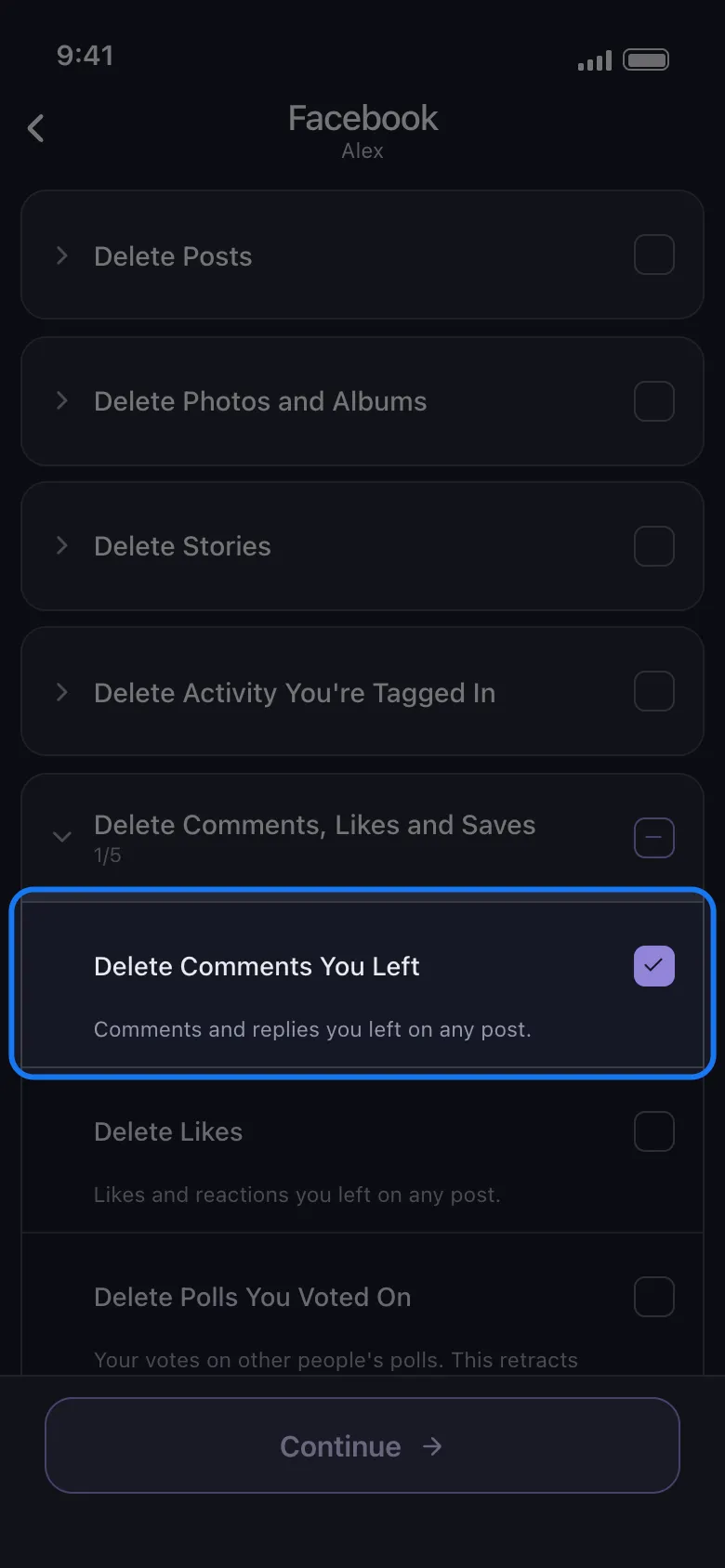
-
On Delete Options, set a Select Date Range if you only want a slice of your history, or leave the filters alone to take everything.
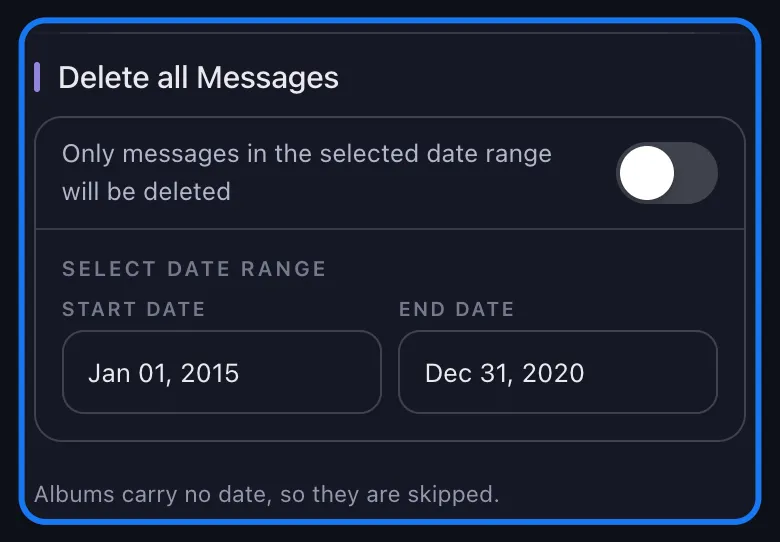
-
Tap Delete. The app shows its pre-run notice first: keep it in the foreground, because the run stops if it goes to the background, and leave your account alone while it works.
-
The Deletion Progress card shows what is running now, how many selections are finished and a running tally.
The free plan stops after 50 deletions a day and comes back the next day; a subscription lifts the cap across every platform in the app. A few hundred comments is a few evenings on the free allowance; five thousand is not. The same app does the same job elsewhere — deleting all your Reddit comments is the closest cousin, and Instagram comments work the same way on the other Meta app.
Start Your Facebook Comment Cleanup
Unpost runs on your phone and deletes the comments you left and the comments left on your posts, filtered by date or keyword. Free plan: 50 deletions a day.
How to clear the comments left on your posts in bulk
The second content type is the one this article exists for. On the same what to delete list, below the groups, there is a row of its own: Delete Comments Left On Your Posts.
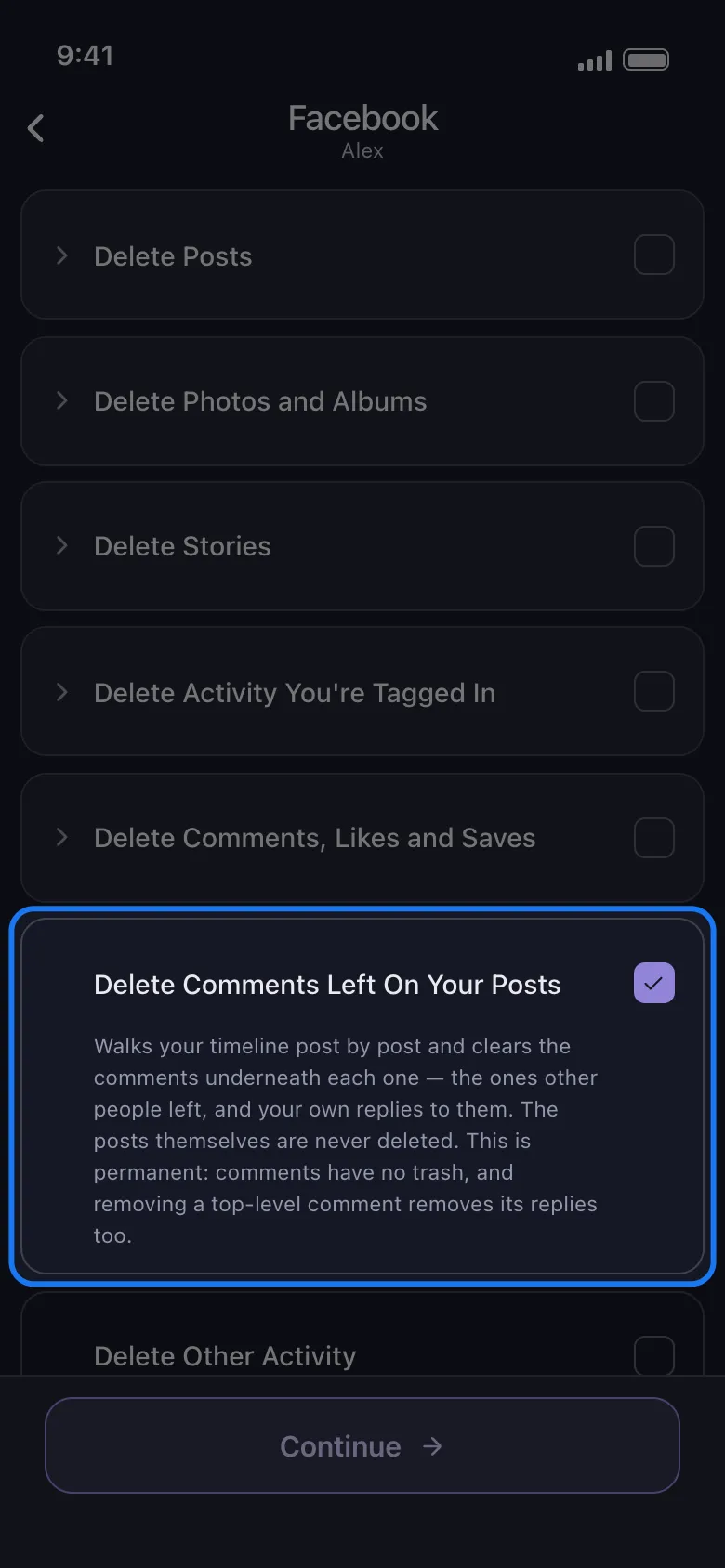
The app describes it without any gloss: it “walks your timeline post by post and clears the comments underneath each one — the ones other people left, and your own replies to them. The posts themselves are never deleted.” That is the whole feature. Your posts stay exactly where they are; the conversation under them goes.
Three things to be blunt about before you tick it:
- It only touches posts you own. This is the moderation Facebook already grants you as the author of a post, done without the tapping. It does not reach other people’s comments under anyone else’s posts, and nothing in the app does — your own comments over there are the previous row’s job.
- It is permanent. Comments have no trash, and removing a top-level comment removes its replies too — including replies from people who were not part of the problem.
- Your own replies go as well. The pass clears the thread, not one side of it.
You can tick both rows in the same run — each selection gets its own pip on the progress card — or run them separately the first time to see the effect of each.
Delete only some comments: date range, keywords and engagement filters
Most people do not want everything gone. The Delete Options screen is where a full sweep becomes a targeted one.
Everything before a certain year. Open Select Date Range, set a Start Date and an End Date, and only items inside the window are touched. This is the safest filter for a comment cleanup, because it does not care whether a comment is text, a sticker or a photo.
Anything mentioning a name, a job or a place. Open Delete by Keywords, type a word, add it, and repeat — the run then removes only items containing one of your keywords. The honest limit is printed on the screen: the keyword filter matches post and comment text only; anything without text is skipped. A sticker, a GIF or a photo-only comment has no text to match, so it survives a keyword run. When those need to go too, use a date range or run the content type unfiltered.
Only the posts that got piled on. Content Filters is the filter most people skip past, and on the wall-comments row it is the sharpest one you have. It bounds a run by like and comment counts — the summary line reads “Deletes posts that have:” — and the hint printed under it says what those counts belong to: “Applies to timeline posts, and picks which posts get their comments cleared.” Set Comments to a minimum of 50 and the run opens only the posts where the pile-on happened; the birthday photo with three comments under it is left alone. The date range still reads each comment’s own date rather than the post’s, so the two stack neatly: posts with 50 or more comments, and inside them only the comments from the years you picked. One caveat — a post Facebook reports no counts for is skipped while a limit is set. And on Delete Comments You Left this filter does nothing at all, because a comment publishes no like or comment count of its own.
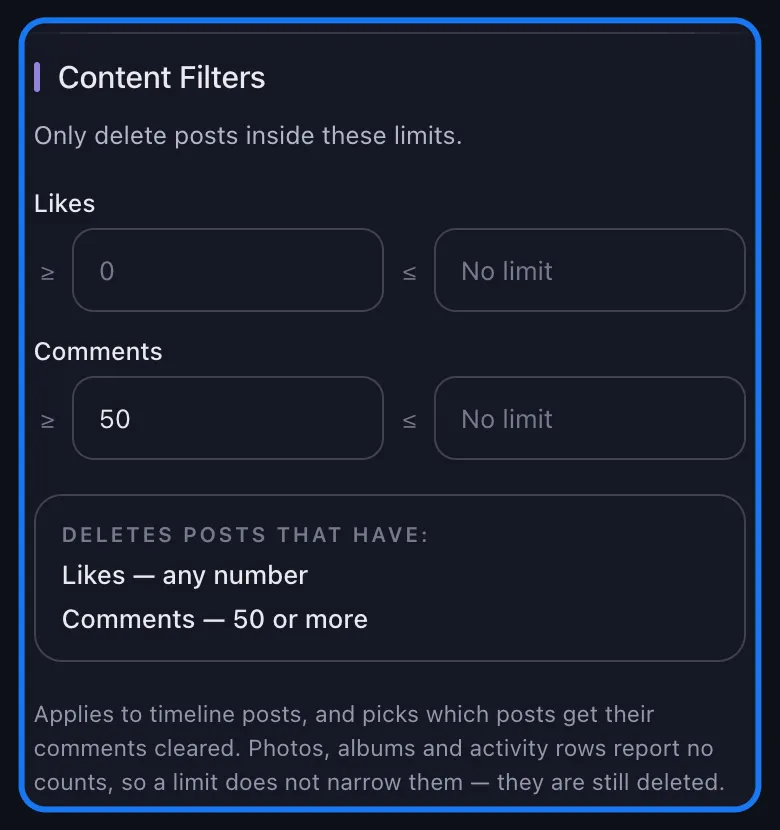
The filter that does nothing on either comment row. The Privacy section limits a run to posts shared with the audiences you pick, but the app states it outright: comments and likes have no audience, so they go either way. That holds for both rows — on the wall-comments pass, the audience of the parent post is never looked at.
Deleting the post instead of the comments
Sometimes the comments are not the problem — the post is. Deleting a Facebook post takes the whole thread with it: every comment, reply and reaction disappears in one action instead of two hundred. If the post has no value to you, that is the fastest cleanup on this page, and how to delete a post on Facebook walks through the steps and the 30-day Trash window that follows. When the argument happened under an old photo album, deleting photos on Facebook is a different flow again.
The trade is simple. Deleting the post removes the memory along with the mess. Delete Comments Left On Your Posts keeps the birthday photo, the graduation, the announcement — and clears the noise that collected underneath it.
What deleting a Facebook comment does and does not do
What it does
- Removes the comment from the post for everyone who could see it.
- Takes any replies to that comment with it.
- Clears it from your own activity log, when the comment was yours.
What it does not do
- Notify the person who wrote it, or the people who replied.
- Reach copies outside Facebook: screenshots, text quoted inside someone else’s comment, notification emails already delivered, search snippets that have not refreshed yet.
- Leave you a way back. There is no trash for comments, no undo, and no backup on Facebook’s side or in Unpost.
None of that is a reason to skip it. Comment text is the most quotable, most searchable thing most people have written on Facebook, and part of what Meta feeds into its AI models — what Meta does with your posts and comments in the UK explains the opt-out picture there, and the privacy tools worth pairing a cleanup with covers the rest of the kit.
Clear the thread, keep the account
So, how do I delete Facebook comments — all of them, not just the one that has been bothering you since Tuesday? One at a time it is press and hold, Delete, confirm (three dots on the web), and that same menu is what lets you clear other people’s comments off posts you own. In bulk it is Unpost: connect Facebook, tick Delete Comments You Left, tick Delete Comments Left On Your Posts, set a date range, and start the run. Deletion is permanent either way, so pick the range before you press the button rather than after.
A sensible first pass on the comments you wrote: set the range to everything older than five years, run it on the free plan’s 50 a day, and see how much of the noise disappears without touching anything you would miss. And on the comments left on your posts, the first pass that pays for itself is Content Filters with Comments set to a minimum of 50 plus that same five-year range — it clears the threads that turned into arguments and leaves every quiet post exactly as it is.
Delete Facebook Comments In Bulk
Install Unpost, connect Facebook, tick Delete Comments You Left and Delete Comments Left On Your Posts, set a date range and start. Free plan: 50 deletions a day, subscription for a whole history.
Frequently Asked Questions

Get Started
Delete Old Content Across Your Accounts
Bulk delete messages, posts, likes, comments, DMs, reactions, bookmarks, followers, and more — all from one app.
No password storage • Free to start • iOS & Android
 Download for iOS
  Download for Android