
So löschst du nur einen bestimmten Zeitraum
Willst du nur deine alten Beiträge löschen oder nur die eines bestimmten Jahres, leg einen Zeitraum fest. Er ist der erste Abschnitt von „Bevor wir löschen“, dem Bildschirm, der sich öffnet, wenn du nach der Auswahl auf „Weiter“ tippst. Discord, Slack, Instagram, Facebook, TikTok, LinkedIn und YouTube haben ihn; X und Reddit nicht.
- 01
Wähle aus, was gelöscht wird, und tippe auf „Weiter“
„Bevor wir löschen“ zeigt nur die Abschnitte, die für deine Auswahl gelten; „Zeitraum“ erscheint also nur, wenn sich etwas davon nach Datum eingrenzen lässt. Lässt sich nichts eingrenzen, überspringt „Weiter“ diesen Bildschirm und öffnet die Übersicht „Überprüfen“.
In der App Startseite → Plattform → Konto → Weiter
- 02
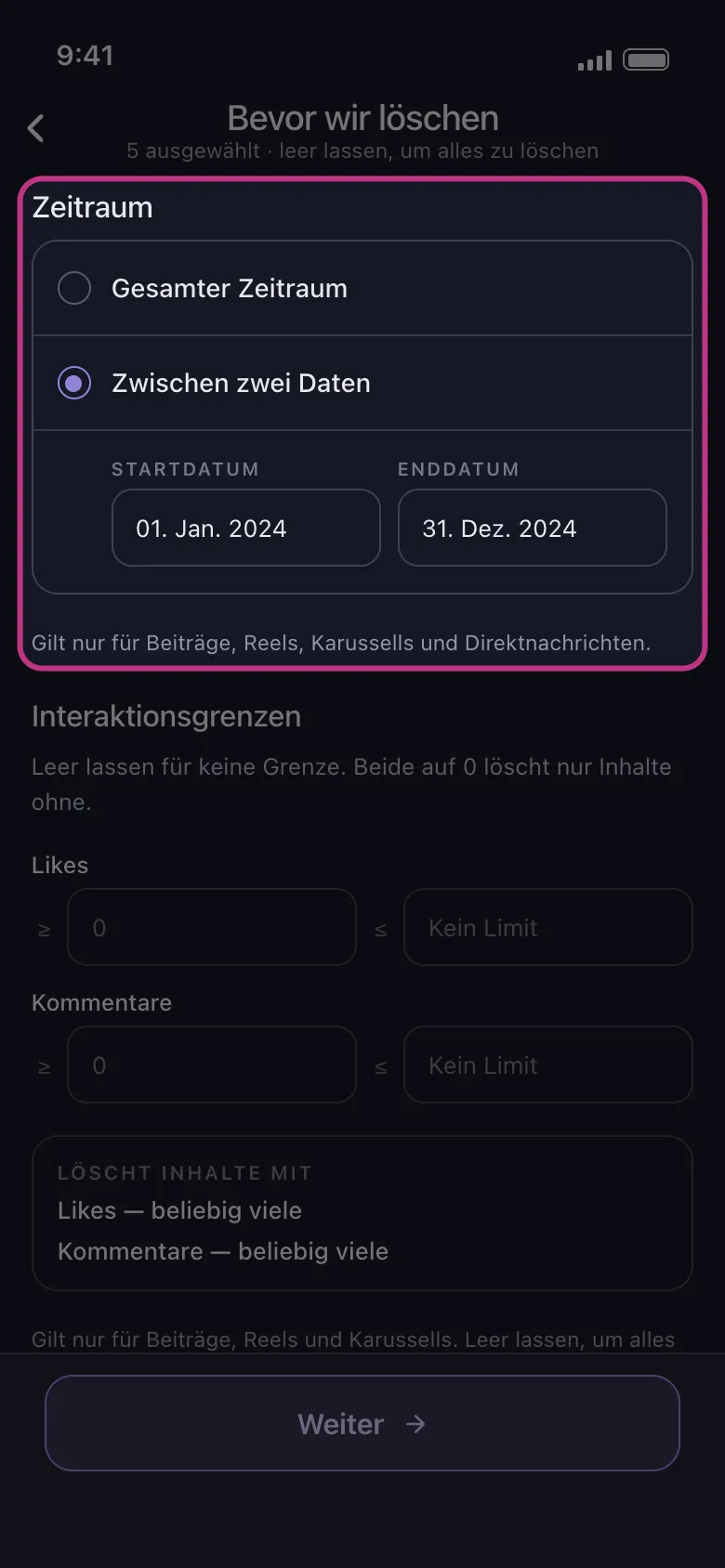
Wähle „Zwischen zwei Daten“
„Gesamter Zeitraum“ löscht unabhängig vom Datum. Tippe auf „Zwischen zwei Daten“ und wähle dann den ersten und den letzten Tag: Sie erscheinen in den Feldern „Startdatum“ und „Enddatum“.
In der App Bevor wir löschen → Zeitraum → Zwischen zwei Daten
- 03
Was der Zeitraum umfasst
Auf Discord und Slack die Nachrichten in jeder ausgewählten Unterhaltung. Auf Instagram Beiträge, Reels, Karussells und DMs; Likes, Kommentare, „Allen entfolgen“ und „Alle Follower entfernen“ werden unabhängig vom Datum gelöscht. Auf LinkedIn Beiträge, Reposts und Kommentare; Reaktionen werden unabhängig vom Datum gelöscht. Auf TikTok alles, was du ausgewählt hast; bei gelikten Videos zählt, wann das Video gepostet wurde, nicht wann du es gelikt hast. Auf Facebook und YouTube alles Ausgewählte außer dem, was kein Datum hat: Solange ein Zeitraum gesetzt ist, wird bei „Alben löschen“ auf Facebook und „Kanäle deabonnieren“ auf YouTube nichts gelöscht.
In der App Bevor wir löschen → Zeitraum
- 04
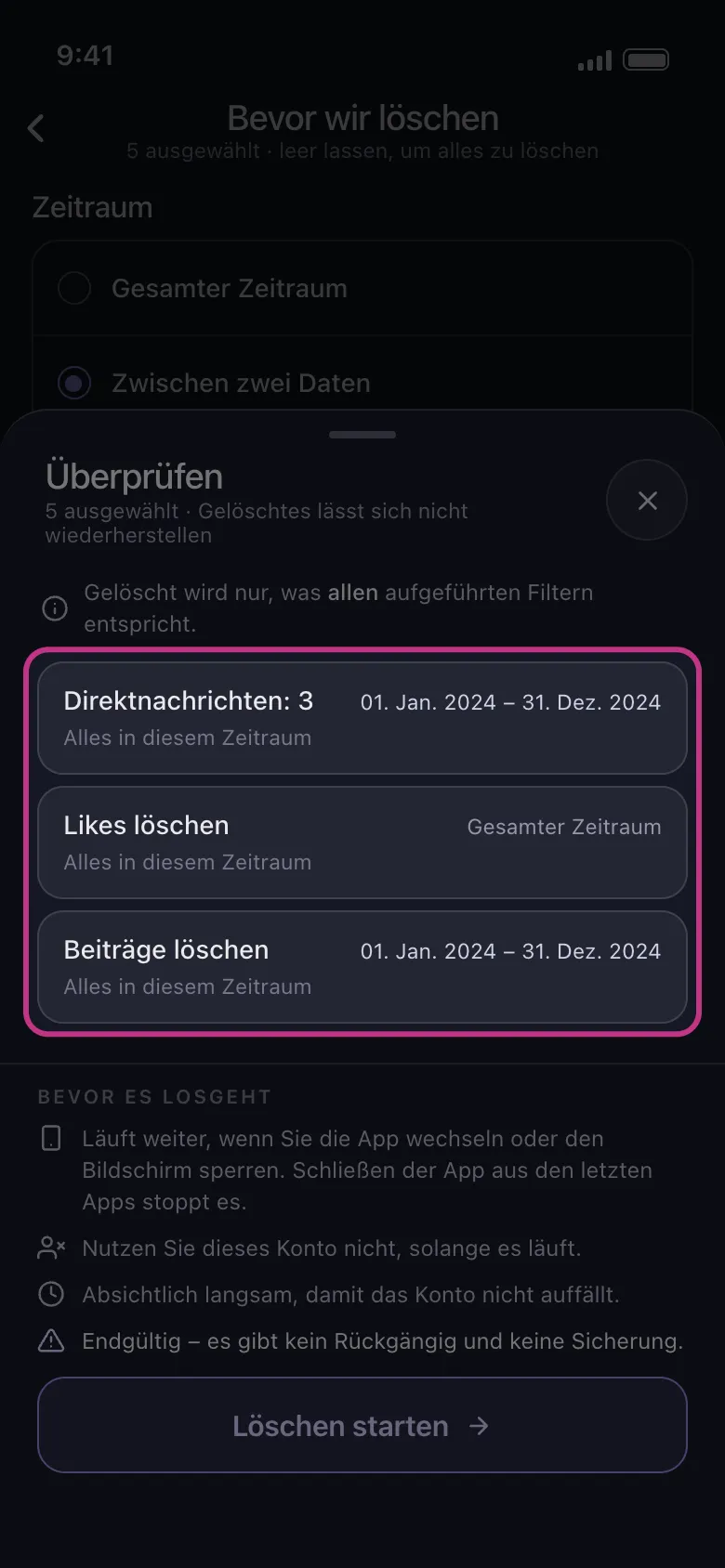
Tippe auf „Weiter“ und sieh dir die Übersicht an
Die Übersicht „Überprüfen“ zeigt eine Kachel für alles, was du ausgewählt hast, mit deinen Daten oder „Gesamter Zeitraum“. Eine Kachel mit „Gesamter Zeitraum“ wird unabhängig vom Datum gelöscht, und eine mit „Übersprungen“ bleibt unberührt. Steht auf jeder Kachel „Gesamter Zeitraum“, ist kein Zeitraum gesetzt: Schließ die Übersicht mit dem × neben ihrem Titel und wähle beide Daten noch einmal. Gelöscht wird erst, wenn du auf „Löschen starten“ tippst.
In der App Weiter → Überprüfen → Löschen starten
Gut zu wissen
- Der Zeitraum wirkt mit den anderen Abschnitten von „Bevor wir löschen“ zusammen: Gelöscht wird nur, was in den Zeitraum fällt und zu jedem anderen gesetzten Filter passt. Siehe „So löschst du Nachrichten, die ein bestimmtes Wort enthalten“ und „So behältst du deine besten Beiträge und löschst den Rest“.
- Es gibt keine Einstellung, um die ältesten oder die neuesten Inhalte zuerst zu löschen.
- In der kostenlosen Version kann jedes Konto auch innerhalb eines Zeitraums bis zu 50 Einträge pro Tag löschen: Ein Zeitraum mit viel Inhalt braucht mehrere Tage.
Weitere Anleitungen