
How to Delete Followers on Instagram
Reviewed by Unpost Team
On Instagram, people usually mean remove followers rather than literally delete another person’s account. Instagram’s current help flow typically says follower removal is available on private accounts: open your profile, open Followers, and tap Remove next to the account you want to take off your list. That changes who follows you. It does not unfollow accounts from your side.
If you only need a few changes, native Instagram is usually enough. If you want a broader reset, such as cleaning up a large follower list and your own following list together, Unpost is often the more practical option because it supports both Remove All Followers and Unfollow All on Instagram.
| Cleanup need | Native Instagram method | What it does well | When Unpost is better |
|---|---|---|---|
| Remove one follower | Profile > Followers > Remove on a private account | Fast for one-off privacy cleanup | You want to reset a large follower list |
| Unfollow one account | Open the account or your Following list and tap Unfollow | Simple for a small number of accounts | You want unfollow all on Instagram as part of a larger cleanup |
| Review likely spam followers | Followers > Potential spam if Instagram shows it | Helpful when Instagram already flagged suspicious accounts | You want a broader reset, not just Instagram’s flagged list |
| Start fresh with followers and following | Repeat the native steps manually | Works, but gets repetitive quickly | You want bulk cleanup on mobile with one tool |
If your follower cleanup is part of a wider reset, the full Instagram cleanup guide also covers DMs, likes, posts, reels, comments, and other account-cleanup jobs.
What This Does and What It Does Not Do
What this does
- Explains the native Instagram method for removing a follower manually.
- Explains how unfollowing differs from removing followers.
- Explains what users can and cannot do about inactive or suspicious followers.
- Shows when Unpost is the better fit for large-scale follower and following cleanup.
What this does not do
- It does not delete another person’s Instagram account.
- It does not claim that every public account sees the same native follower-removal option.
- It does not promise a native Instagram button that purges inactive followers on demand.
Native Instagram Method: Remove a Follower Manually
If your question is how do you delete followers on Instagram, the practical answer is usually remove a follower from your list.
Instagram’s current help flow says follower removal is tied to your account’s privacy setup and is available on private accounts. The current flow is usually:
- Open Instagram and go to your profile.
- Open Followers.
- Find the account you want to remove.
- Tap Remove next to that account.
- Confirm the removal if Instagram asks.
When you remove a follower, Instagram typically does not send that person a direct notification saying you removed them. The person can still try to visit your profile later. On a private account, they would normally need to follow again and wait for approval. On public-account setups, behavior may vary, which is why Instagram’s own help flow currently centers follower removal on private accounts.
This is the clearest native answer to how do I delete followers on Instagram when the job is small and you want to review accounts one by one.
Removing Followers vs Unfollowing on Instagram
This topic gets mixed up constantly, so it helps to separate the two actions.
Remove followers
Removing followers changes who follows you. It is a privacy-control action. People usually do it when they want less access from certain accounts, a tighter audience, or a cleaner follower list.
Unfollow accounts
Unfollowing changes who you follow. It does not remove anybody from your follower list. If your goal is to stop seeing updates from accounts you follow, the usual native flow is to open that account and tap Following, then Unfollow, or open your own Following list and unfollow accounts there one by one.
That difference matters because many people search how to delete followers from Instagram when their real goal is actually an audience reset on both sides:
- remove followers who no longer need access to the account
- unfollow accounts that no longer match the account’s purpose
If that is your real job, handling followers and following together is usually more useful than solving only one side of the list.
Does Instagram Delete Inactive Accounts or Inactive Followers for You?
This is where many searches go off track.
If you are asking does Instagram delete inactive accounts, the honest answer is that users do not get a native control that tells Instagram to purge inactive followers from their list on demand. Instagram may take its own platform-wide action against spam, fake, or inactive accounts over time, but that is not the same thing as a user-managed cleanup tool.
What Instagram does currently provide is more limited:
- You can manually remove followers one by one if your account setup supports that flow.
- Instagram may show a Potential spam section in your followers list.
- If Instagram has already flagged accounts as likely spam, Instagram may let you review them or use Remove all spam followers for that flagged group.
That helps with some suspicious accounts, but it is not a true “delete all inactive followers” command. So if the real problem is “I do not trust most of this follower list anymore” or “I want to start over clean,” manual Instagram cleanup can feel slow very quickly.
When Unpost Is Better
Instagram deserves the first mention here because it already offers a native manual method. Unpost becomes the better fit when the job is no longer a few taps in your followers list.
On Instagram, Unpost supports both Remove All Followers and Unfollow All. That makes it especially useful when you are not just trying to remove one annoying follower, but instead trying to reset the account more broadly.
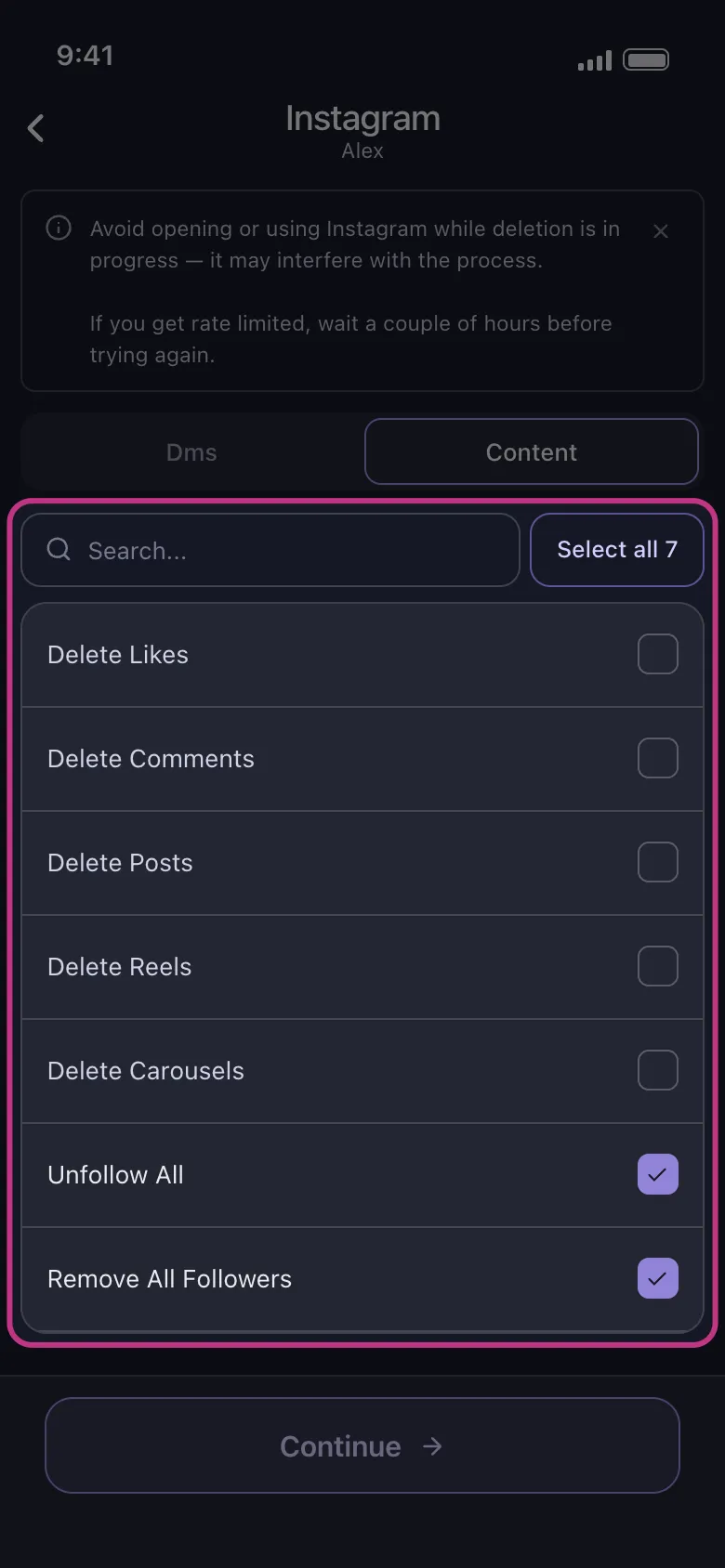
Unpost is usually the stronger option when:
- you are doing a privacy reset after the account became too visible
- you are rebranding and want a cleaner audience and following list
- you picked up too many spammy or low-value followers and want a fresh start
- you want to stop following large numbers of accounts without doing it manually for hours
If that sounds like your situation, Try Unpost. Unpost is a mobile app for iOS and Android that helps users bulk delete social media content and handle broader Instagram cleanup tasks, including follower and following resets.
How Unpost Handles Larger Follower and Following Cleanup
The practical value of Unpost here is convenience and scale, not mystery features. Instagram typically treats follower removal and unfollowing as manual account-management work. Unpost is useful when you want to perform supported cleanup actions in bulk instead of repeating the same native steps over and over.
On Instagram, Unpost supports remove all followers, unfollow all, deleting DMs, deleting posts, reels, carousels, likes, and comments.
That matters because a follower cleanup project often expands. Someone starts by asking can u delete followers on Instagram, then realizes the real job also includes old likes, outdated posts, or a following list that no longer matches the account.
If your cleanup is moving in that direction, related guides on how to delete Instagram posts, photos, reels, and carousels and how to delete likes on Instagram are usually the next steps after follower and following cleanup.
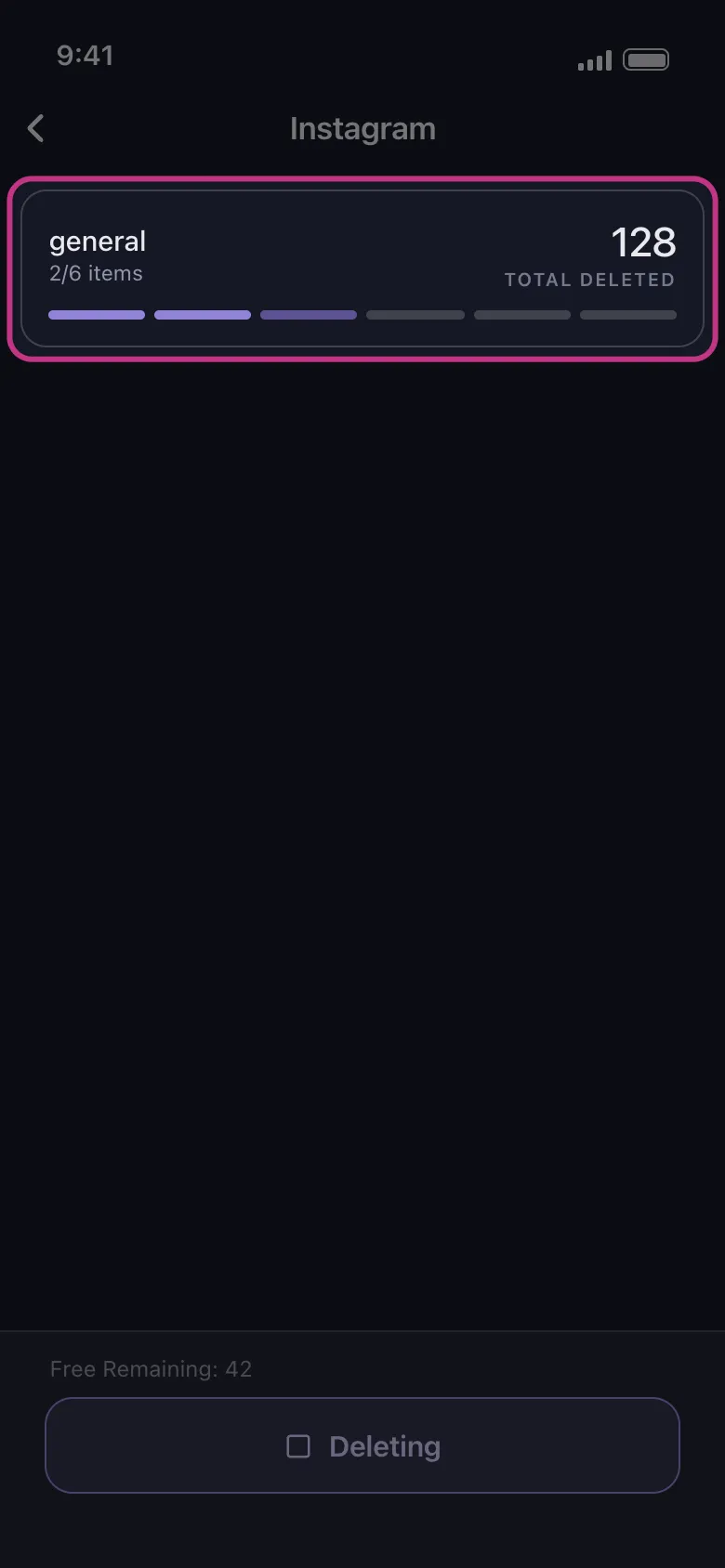
When you use Unpost, the app connects through Instagram web login in an embedded browser and stores encrypted session data locally on your device. Keep Unpost in the foreground while deletion runs, and do not actively use Instagram at the same time because that can interfere with the process. If Instagram temporarily rate limits the action, the run may need to pause and retry before continuing.
FAQ
Can u delete followers on Instagram?
Yes, but the native action is usually called remove a follower, not literally delete the person. Instagram’s current help flow says follower removal is available on private accounts. If you only need to remove a few people, the native method is usually enough.
How do you delete followers on Instagram if your account is public?
Instagram’s current help materials tie follower removal to private accounts, so public-account behavior may not match the same flow. If you do not see Remove in your followers list, check your privacy setup first.
Is removing a follower the same as unfollowing them?
No. Removing a follower affects who follows you. Unfollowing affects who you follow. People often need both actions during the same cleanup project, but they solve different problems.
Does Instagram delete inactive accounts?
Instagram may take action on spam, fake, or inactive accounts over time, but users cannot tell Instagram to delete inactive followers on demand. If Instagram has already flagged accounts as potential spam, Instagram may let you review or remove that flagged group.
Can you unfollow all on Instagram natively?
Instagram typically treats unfollowing as a manual action. If your goal is unfollow all on Instagram, native cleanup can become tedious because you are usually working through accounts one by one. That is one of the clearest cases where Unpost fits better.
Who Should Use Unpost Here?
Unpost is the best fit for this page when your real task looks like one of these:
- you want to start fresh with both followers and following
- you are cleaning up an account after a rebrand or privacy reset
- you no longer trust the quality of much of the follower list
- you want one mobile workflow for followers, following, likes, posts, comments, and DMs
If you only need to remove one or two followers, native Instagram is simpler. If you need a broader audience reset or you want to combine follower cleanup with other Instagram cleanup work, Try Unpost.
Bottom Line
The short answer to how to delete followers on Instagram is that Instagram usually calls the action remove a follower, and the current help flow ties that feature to private accounts. Use the native follower list for small changes. Use native unfollowing when the job is only about accounts you follow.
When the real task is bigger, such as removing many followers, unfollowing many accounts, or pairing that reset with post, like, or comment cleanup, Unpost is the more practical workflow. Start with the native method if the list is short. If the cleanup has become a full reset, Try Unpost.

Get Started
Delete Old Content Across Your Accounts
Bulk delete messages, posts, likes, comments, DMs, reactions, bookmarks, followers, and more — all from one app.
No password storage • Free to start • iOS & Android
 Download for iOS
  Download for Android