
Unpost for Instagram
Instagram cleaner: mass delete your DMs, posts and likes
Unpost deletes what you left on Instagram, one item at a time from your phone: the messages you sent in your DMs, your posts, reels and carousels, your likes and your comments. It can also unfollow everyone, or remove all your followers.


50 free deletions per connected account, every dayFree vs Premium
What it deletes on Instagram
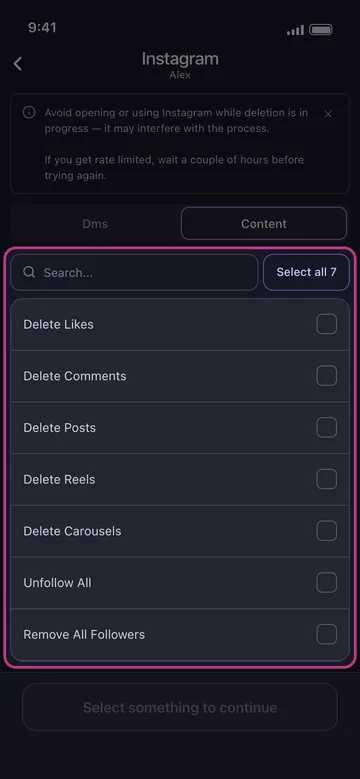
Your direct messages, and seven kinds of content to tick one by one or all at once.
-
Direct messages
The messages you sent, in your real conversations, listed when you open the app. In a DM only what you sent can go: the other person’s messages stay.
-
Posts, reels and carousels
Each kind is its own line, and each can be narrowed by a date range and by its likes and comments.
-
Likes and comments
The likes you left on posts and the comments you wrote, each its own line.
-
Following and followers
Unfollow All unfollows every account you follow; Remove All Followers removes everyone who follows you.
That is the full list on Instagram: stories aren’t part of it.
Two tabs, one run
Tap your Instagram account and the list opens on two tabs. Tick from one or both, and a single run deletes it all.
-
Your direct messages
In the app Dms
Your conversations, as Instagram lists them: tick one, several or all. Only the messages you sent are deleted, and a date range or keywords can narrow them.
How to choose which content types get deleted -
Your posts, likes and followers
In the app Content
Seven lines, from likes to followers, or Select all 7. Unfollow All and Remove All Followers sit in the same list: tick them only on purpose.
How to keep your best posts and delete the rest
Choose exactly what goes
Leave the options empty to delete everything you ticked, or narrow the run. Each option shows only where it applies:
-
Date range
All time, or only Between two dates: for posts, reels, carousels and direct messages.
-
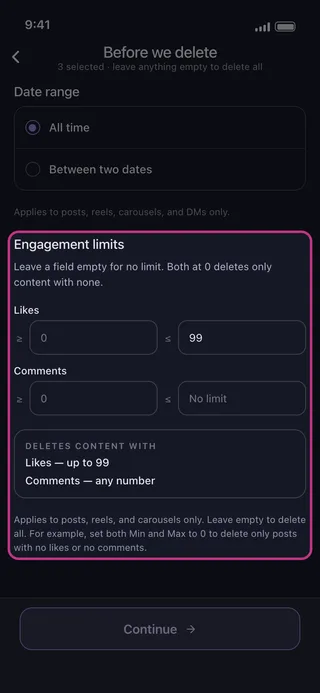
Engagement limits
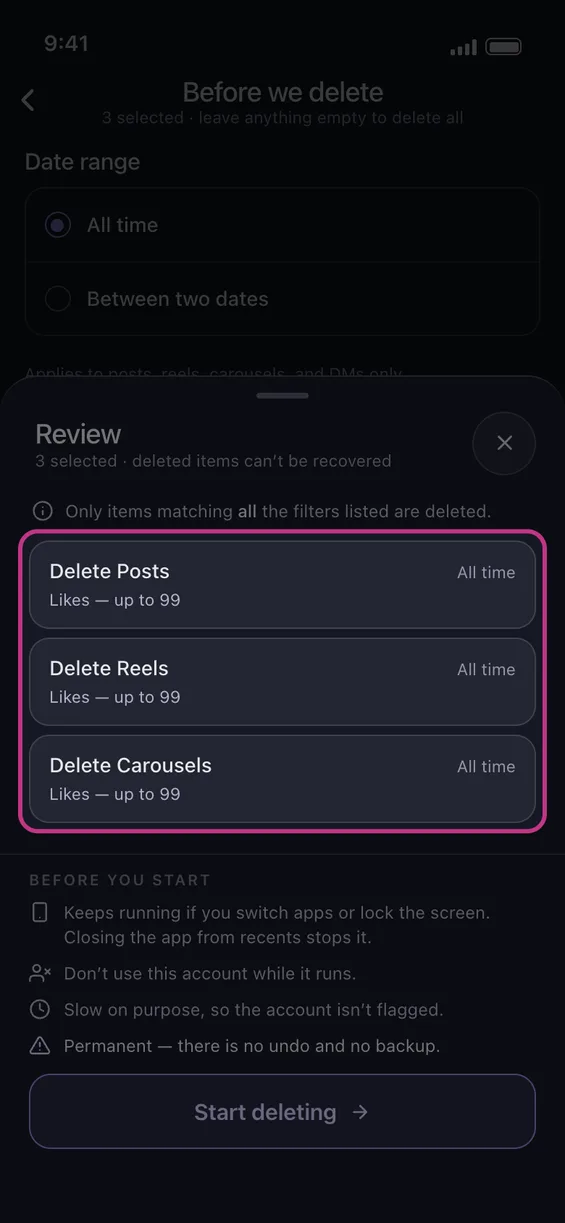
A minimum, a maximum or both, on likes and on comments: up to 99 likes deletes those posts and keeps the ones with more. Both at 0 deletes only posts with none. For posts, reels and carousels.
-
Keywords
For direct messages: add one or more words, and only your messages containing one of them are deleted.
Likes, comments, Unfollow All and Remove All Followers have no options. Elsewhere, only what matches every filter you set is deleted.
How it works
The first time, from install to a running deletion:
-
Install Unpost
From the App Store or Google Play. Pick the app’s language, then tap Continue under the privacy policy.
-
Connect Instagram
Without Premium the app opens on its Subscription tab: tap Main, then the Instagram tile and Connect Instagram. You log in on Instagram’s own page, inside the app.
-
Pick
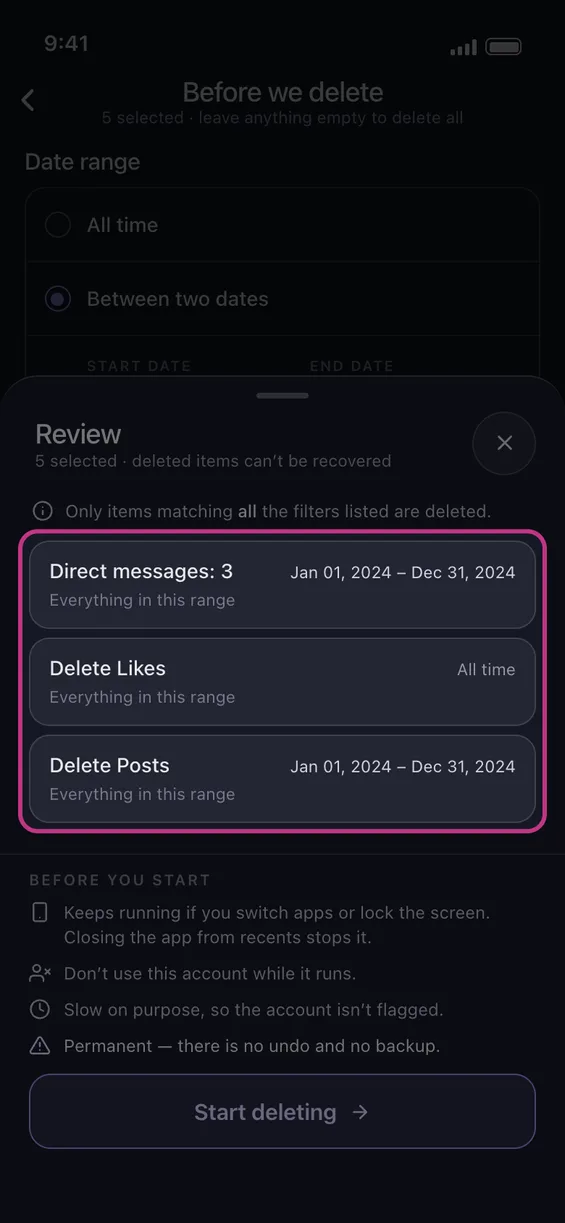
Tap your account, tick what to delete on the Dms and Content tabs and tap Continue. When an option applies, set it, then tap Continue again.
-
Review
The Review sheet counts what you picked without naming it (Direct messages: 3), with each tile’s date range and filters, then the rules of a run under Before you start.
-
Start
Tap Start deleting and leave the app running until the run ends.
Slow on purpose
- One item at a time, slowly on purpose, so the account isn’t flagged.
- Don’t open or use Instagram while it runs: it may interfere with the run. If Instagram rate-limits you, wait a couple of hours before trying again.
- On Android a run keeps going in the background and with the screen locked, but not if you close the app from recents. On an iPhone the app has to stay open on screen.
- It’s permanent: there is no undo and no backup.
Free vs Premium
Free to start. Premium when you need more.
Same app and same platforms on both plans: Premium lifts Unpost’s daily cap, not the platforms’ own rate limits.
Free
For trying it out and for small cleanups
- 50 deletions per connected account, every day (the day runs on UTC)
- Every platform: Discord, Instagram, X (Twitter), TikTok, Slack, LinkedIn, Facebook, YouTube and Reddit
On Reddit, the free plan randomizes posts and comments instead of deleting them: each one is edited into random words, with a line crediting Unpost. Those edits don’t count toward the 50.
How the free daily limit worksPremium
For big backlogs and regular cleanups
- No daily cap, on any platform
- Permanent delete for Reddit posts and comments
- No Unpost credit line on Reddit
- One monthly subscription, bought through the App Store or Google Play
Price shown in your App Store or Google Play.
Upgrading to Premium and restoring itWhat happens to your Instagram account
-
You sign in on Instagram’s own page
The login opens inside the app, on instagram.com: you type your password into Instagram’s page, not into a form of Unpost’s.
-
The session stays on your phone
What Instagram issues at login is kept on the phone, in encrypted storage. Logging out of every account in Settings clears it.
-
No Unpost server in between
What you delete never passes through an Unpost server: the delete requests go from your phone straight to Instagram.
Questions about cleaning up Instagram with Unpost
Can I delete all my Instagram messages at once?
Is it free?
Can I keep my most-liked posts?
Why is it slow, and what if Instagram stops it?
Does it work on iPhone and Android?
Can I undo a deletion?
Do I give Unpost my Instagram password?
Keep reading
How to do it, step by step: on Instagram itself and in the app.
Instagram guides
- Start here Instagram Cleanup Guide: Delete Messages, Posts, Likes, Followers, and More A practical Instagram cleanup hub covering messages, posts, reels, comments, likes, followers, Stories, and account changes, with clear native steps and bulk-cleanup guidance.
- Delete All Instagram DMs at Once: Bulk and Manual Ways Instagram has no button to delete all DMs at once. What deleting and unsending really remove, the fastest manual routine, and how to clear many chats in bulk.
- How to Mass-Delete Instagram Posts (All or Multiple at Once) Instagram's multi-select flow deletes several posts at once, but mass deletion hits batch caps and rate limits. How to clear multiple posts or your whole grid.
- How to Delete Likes on Instagram Learn what deleting likes on Instagram actually means, how to unlike posts manually through Instagram's Your Activity flow, and when Unpost is the better option for bulk like cleanup.
- How to Delete a Comment on Instagram Learn how to delete one Instagram comment manually, how to review comments you wrote in Your Activity, and when Unpost is the better option for larger Instagram comment cleanup.
Step by step in the app
- How to choose which content types get deleted
- How to keep your best posts and delete the rest
- How to add an account and run your first cleanup
- How to delete only a date range
- How to lower the risk of Instagram locking your account during a cleanup
- Instagram won’t connect: stuck on the feed, signed out, or asked for a birthday
