
How to Clean Up Your Social Media, Platform by Platform
Knowing how to clean up your social media is mostly knowing the order. If a job search is the reason, the public profiles go first, because those are what a recruiter opens without asking you.
How to clean up your social media in five steps
- Find every account, including the forgotten ones. One evening with your inbox and a search engine.
- Download your data from each platform before anything is deleted. Request the exports first; they arrive while you do step 3.
- Decide what stays: a date cut-off, a list of keywords, and which posts are worth keeping.
- Delete platform by platform: LinkedIn, X, Facebook, Instagram and TikTok first, then Reddit, then the private messages on Discord, Slack and Instagram.
- Handle what you can’t delete yourself: tags on other people’s posts, screenshots, archived copies.
Step 1: find every account you still have
The account that surprises a recruiter is rarely the one you use daily. It is the 2013 blog, the Reddit handle from college, the Instagram you made for a band. Three places list them:
- Your e-mail. Search every address you have used for “welcome”, “confirm your email” and “verify your account”. Each hit is a sign-up.
- Your saved passwords, in a password manager or the browser. Every saved login is an account.
- “Sign in with” lists. Your Google, Apple and Facebook accounts each keep a list of the apps and sites you signed into through them.
Then search your full name and every old username in a search engine, and run a reverse image search on old profile photos. Write the list down: for each account, decide whether you delete it or keep and clean it. Deleting an account is done in that platform’s own settings, and only after step 2.
Step 2: download your data before you delete
Deleting is permanent: there is no undo and no backup, so the platform’s export is the only copy you will have.
Instagram, Facebook, X, TikTok, LinkedIn, Reddit and Discord each let you request a copy of your account’s data from their settings or privacy pages. Request all of them on the same day.
The export also finds what you forgot. Unpost, the app step 4 uses for the bulk deletes, can also import the whole export on Discord, Reddit and X, as a .zip file or a folder, and delete from it: it reaches old content the platform’s own screens no longer list. The export is read on the phone, never uploaded. The data package guide walks through it.
Step 3: decide what stays
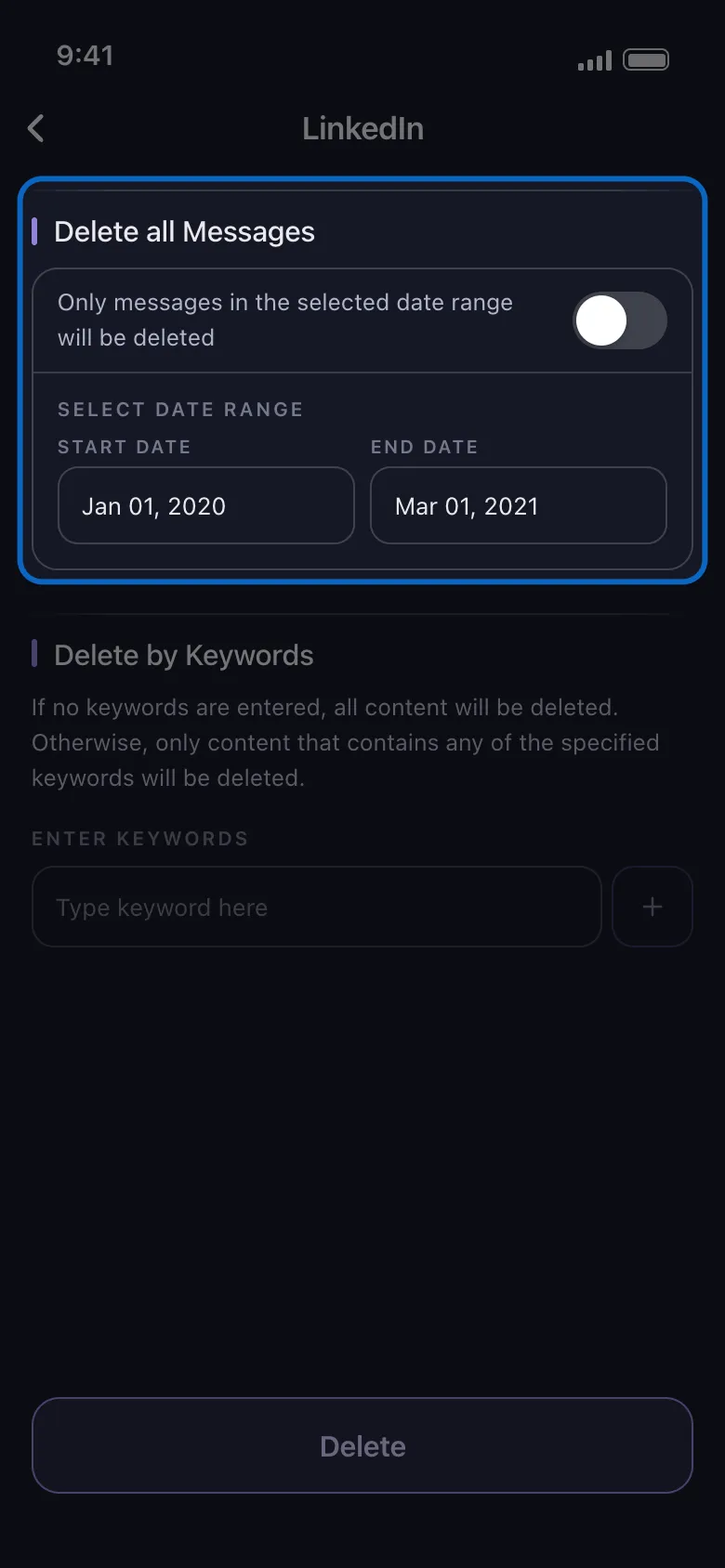
“Delete everything” is rarely what people want. A filter turns it into a rule you can write in one line, such as “everything before March 2021 that mentions my old employer”. Each platform offers some of these; the table in step 4 says which platform has which:
- A date range: everything before you started job hunting, or before a breakup, or a single bad year.
- Keywords: an ex-employer’s name, a nickname, a team you used to argue about.
- Bounds on likes and comments: delete the posts nobody engaged with and keep the ones people loved.
- The post’s audience: delete only what was shared publicly.
One limit to know before you rely on keywords on Facebook: the filter matches post and comment text only, so a photo posted without a caption is skipped, not deleted. Run a date-range pass for those.
Step 4: delete platform by platform
Each platform’s own delete buttons are covered in its guide, linked in the first column. The table is what Unpost deletes on each in bulk, in the app’s own category names, with the filters from step 3 and what to know before a run: free up to 50 deletions per connected account per day, Premium removes the cap.
| Platform | What Unpost deletes | Options | Before you run |
|---|---|---|---|
| Posts, Reposts, Comments, Reactions | Date range, keywords | Rate limits are strict; keep LinkedIn closed during a run, and expect to log in again now and then | |
| X (Twitter) | Posts, Reposts, Replies, Quotes, Likes, Bookmarks | Data export import | Likes: a normal unlike, or like-then-unlike for the ones a plain unlike misses |
| Text Posts, Photo Posts, Reels, Videos, Comments You Left, Likes, Posts on Others’ Profiles, Albums, Your Stories and more | Date range, likes and comments, keywords, audience | Keywords skip anything without text | |
| Posts, Reels, Carousels, Comments, Likes, DMs, Unfollow All, Remove All Followers | Date range, likes and comments | Don’t open Instagram during a run; if you get rate limited, wait a couple of hours before trying again | |
| TikTok | Videos, Reposts, Comments, Comments On My Videos, Liked Videos, Watch History | Date range, likes, comments and views, keywords (comments only) | Clears what you watched and liked, not only what you posted |
| Posts, Comments, DMs | Data export import | Free accounts get Randomize Content: each post or comment is edited into random words with a line crediting Unpost, and stays on Reddit. Delete Content removes them for good and needs Premium | |
| Discord | Your messages in DMs and servers | Date range, keywords, comments only or comments + threads + reactions, data export import | In DMs, only messages you sent; as a server admin, anyone’s messages in the servers or channels you moderate |
| Slack | Your messages in DMs and channels | Date range, keywords, messages, threads and reactions each on or off | As an admin, anyone’s messages in the channels you moderate |
Work oldest first: on the platforms with a date range, a range that ends on your cut-off day leaves everything newer untouched.
Running every platform from one install
Unpost’s bulk delete for posts, comments, messages and more works the same way on every platform above, so the steps are learned once:
-
Download Unpost from the App Store or Google Play.
-
Open it, pick a language, then tap Continue under the privacy policy.
-
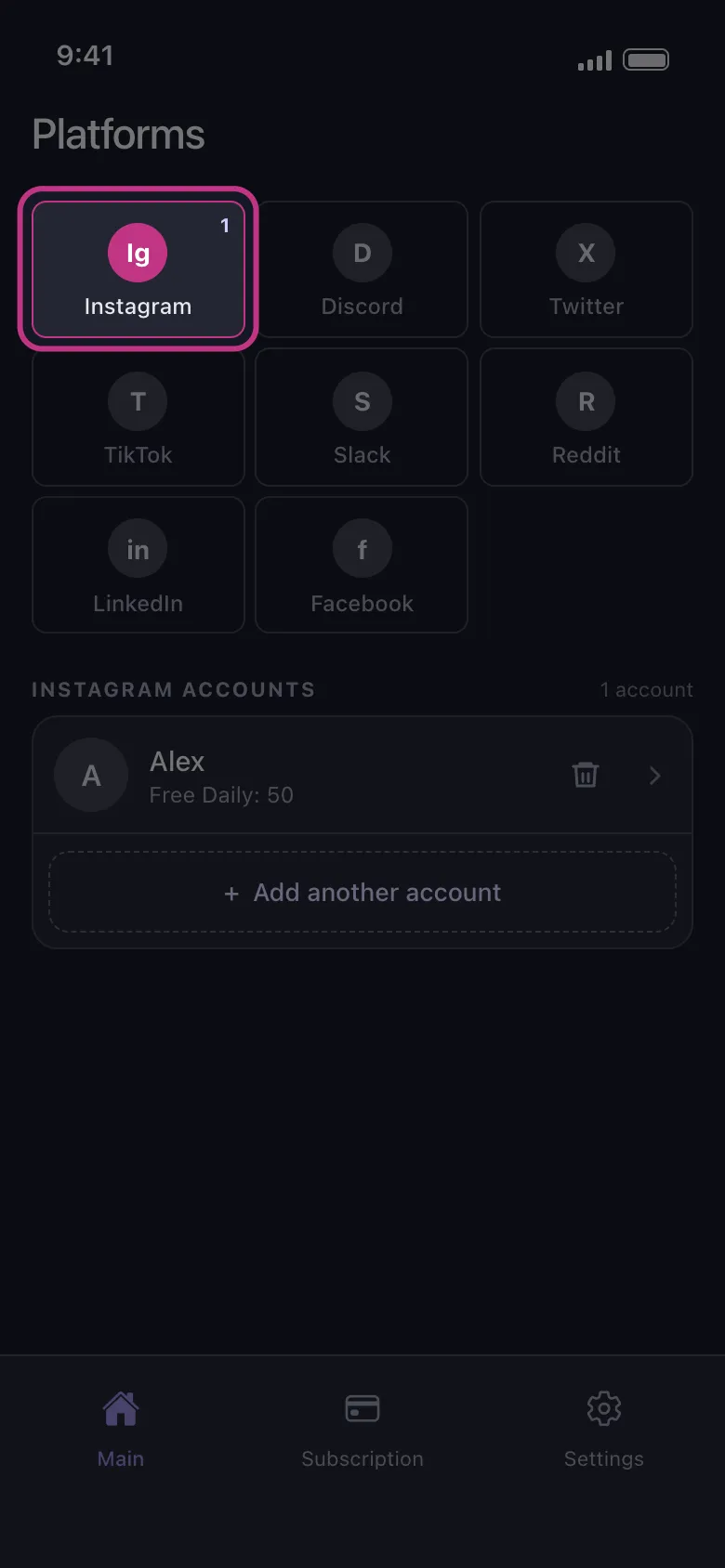
Without Premium, the app opens on its Subscription tab: tap Main in the bottom bar to reach the platforms.
-
Tap the platform’s tile, then the button under it, which reads Connect followed by the platform’s name, and log in on the platform’s own page, which opens inside the app.
-
Tap the connected account. Where the platform offers several ways, choose one: straight from the account, as admin, or from a data export.
-
Pick what to delete, set the filters from step 3, then tap Delete.
-
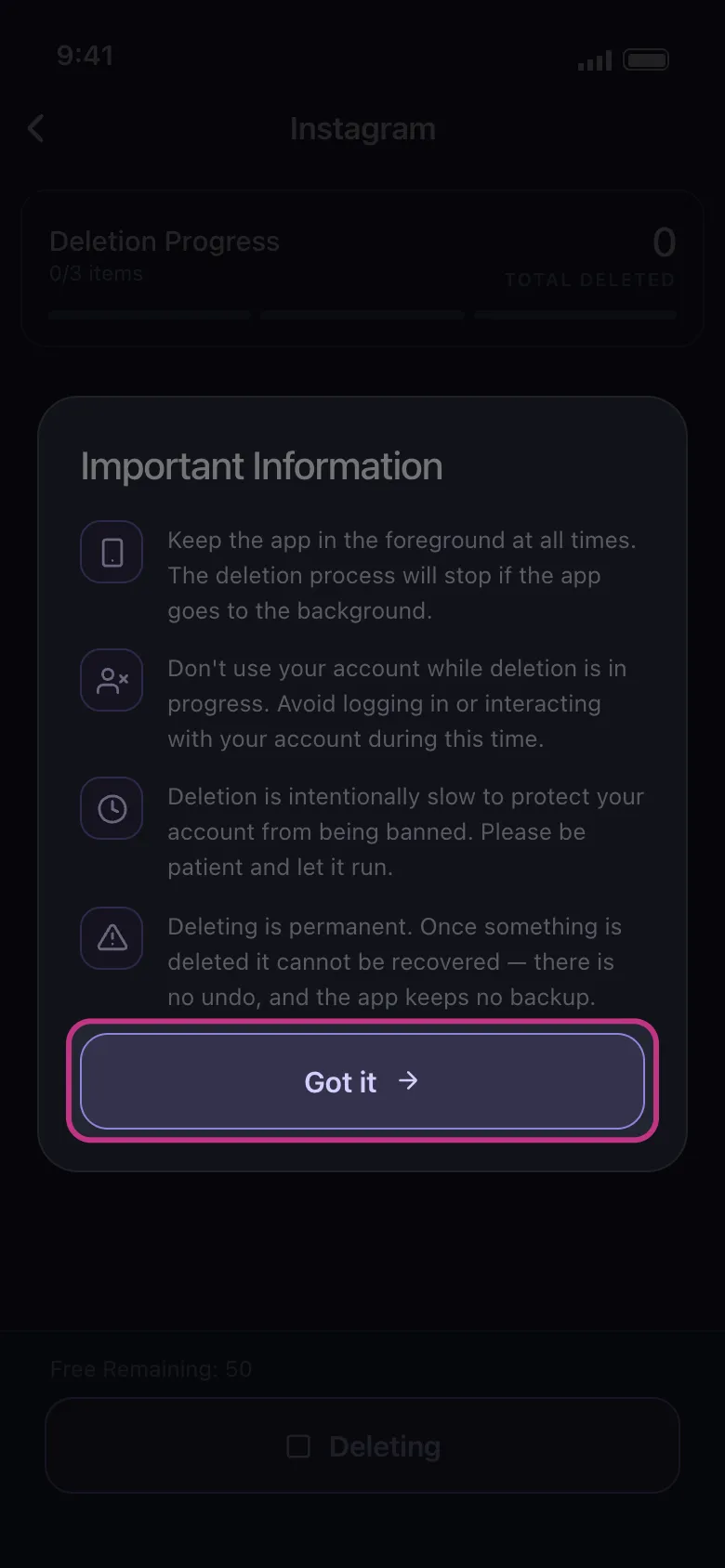
Read the rules the app shows and tap Got it. Keep the app running until the run ends: on an iPhone it must stay in the foreground; on Android it goes on in the background and with the screen locked, but not if you close it. Don’t use the account meanwhile.
Runs are slow on purpose, to protect the account from a ban. You can connect several accounts per platform. Without Premium, each connected account can delete 50 items a day (the day is UTC, from server time), Reddit not counted; the run stops when they are used and the allowance comes back the next day. That covers a first pass on each platform. A deep history is another matter: 3,000 old posts on X is 60 days at 50 a day. Premium, one monthly subscription through the App Store or Google Play, removes the cap on every platform at once and unlocks Reddit’s Delete Content.
On privacy, sign-in happens on each platform’s own page, the sessions stay on the phone in encrypted storage, and deleted content never passes through an Unpost server. The app does keep a per-account counter (deletions left that day, totals, Premium status) in its Firebase database, and ships analytics, session replay and crash reporting (Firebase, Microsoft Clarity, Sentry).
Step 5: what a cleanup cannot reach
Your own posts are the easy part. These need a different move:
- Other people’s posts that tag you. Remove your tag where the platform offers it, ask the poster to delete the post, and report it if it breaks the platform’s rules. On Facebook and Instagram, turn on tag review so new tags wait for your approval.
- Quotes, reposts and screenshots. A quote of your post or a screenshot of it is someone else’s content. Deleting your original does not remove it; only its owner or the platform can.
- Archive sites. A page saved by a web archive keeps its copy after you delete the original. Ask the archive to remove it; the Internet Archive takes removal requests.
- People-search and data-broker sites. They compile profiles from many sources and each runs its own opt-out form. No social media tool touches them.
- What the platform itself keeps. A platform can hold deleted content for a period its privacy policy sets. A deletion request under GDPR or CCPA, sent to that platform, is the route for it.
Keep it clean: a yearly sweep
A cleanup done once drifts back in a year. Put a date in your calendar and repeat two things:
- A run covering the past twelve months (a date range where the platform has one), with the same keyword list from step 3.
- A settings check on each account you kept: who can see future posts, who can tag you, and who can find you by e-mail or phone number.
Start with the profile a recruiter would open first: download Unpost, connect that account, and run the date range you wrote down in step 3.
Frequently Asked Questions

Get Started
Delete Old Content Across Your Accounts
Bulk delete messages, posts, likes, comments, DMs, reactions, bookmarks, followers, and more — all from one app.
No password storage • Free to start • iOS & Android
 Download for iOS
 Download for Android